• Skip to primary navigation
  • Skip to main content
  • Skip to primary sidebar

Kitchenware Compare

  • Home
  • Product Reviews
    • Air Fryers
    • Coffee
    • Cookware
    • Flat Top Grills
    • Meat Thermometers
    • Food Processors
    • Knives
    • Pizza Ovens
    • Toaster Ovens
    • Juicers
  • Food Blog
  • Helpful Kitchen Tips
  • Data Studies
  • About
  • How We Review
  • Contact
You are here: Home / Archives for Product Reviews

Cuisinart Pro Custom 11 DLC-8SBCYP1 Review: Worth the Upgrade?

Last Updated July 25, 2026

Cuisinart Pro Custom 11 DLC-8SBCYP1 food processor in brushed chrome with bowl and discs

This article contains affiliate links. If you purchase through them, I may earn a small commission at no extra cost to you. Read the full disclosure.

Quick verdict: 7.5/10 — Best for: anyone who wants Cuisinart’s reliability but refuses to hand-wash a blade every time. Not ideal for: anyone who regularly chops large batches of nuts (the chopping blade can pop off its post) or wants the largest possible bowl. Current price: Check price on Amazon. Bottom line: the same price as the site’s Best Overall pick, 3 cups smaller, and fully dishwasher-safe — the right trade for anyone who counts cleanup time as a real cost.

The Cuisinart Pro Custom 11 DLC-8SBCYP1 is the buying guide’s “Best for Easy Cleanup” pick, and that’s exactly the right way to think about it: at the same $199.95 as the Cuisinart DFP-14BCNY, this is the version for someone who has decided cleanup friction, not capacity, is what actually determines whether a food processor gets used.

I haven’t tested this one personally. Taste of Home’s Product Testing Team has, though: they put this exact model up against 7 other food processors, including the Breville Sous Chef and a BLACK+DECKER budget option, chopping walnuts, slicing tomatoes, shredding cheese, and making pesto and pie dough under controlled conditions. It came out their favorite of the 8. What follows combines their real test results with Amazon’s aggregated data across 3,433 verified owner ratings, which surfaces a couple of specific complaints their lab test didn’t run into.

Check Price on Amazon →

Cuisinart Pro Custom 11 DLC-8SBCYP1: Key Specs

Spec Detail
Bowl capacity 11 cups
Motor 625W
Included accessories Chopping/mixing blade, 2 slicing discs, 1 shredding disc, small and large pushers, spatula
Dimensions 7″D x 11.25″W x 14.5″H
Dishwasher safe Yes — bowl, lid, blade, and discs all top-rack safe
Warranty 5 years on the motor, 3 years limited overall
Price $199.95

What It Does Well

Full dishwasher safety is the headline, and Amazon’s owner data backs it up as a genuine, repeated point of praise — multiple reviewers specifically call out how much easier this is to clean than a previous food processor, one describing the simpler lid design (no chute assembly to trap water and grow mildew) as “a dream to clean” compared to an older Cuisinart model. That’s not a minor convenience: the site’s DFP-14BCNY review already flags hand-washing the blade as that model’s biggest recurring complaint, and this is Cuisinart’s direct answer to it.

The three included discs (two slicing widths plus one shredding disc) give more cut-type variety than most processors in this price range, which typically ship with two. Owners consistently describe the motor as strong and quiet, and several specifically praise how smooth purees and sauces come out with no leftover chunks. The paddle-style controls replace the older push-button design, which multiple long-term owners say wears out less and wipes clean more easily.

A small but genuinely useful detail: a built-in cord-wrap strap, which several reviewers call out by name as something they didn’t know they needed until they had it.

Taste of Home’s lab test backs up several of these owner impressions with real side-by-side data: this model produced the cleanest, most uniform tomato slices of all 8 processors tested (helped by a feed tube wide enough to fit two Roma tomatoes uncut), and their testers specifically noted it ran quietly and stayed put on the counter without needing suction feet, thanks to weight and rubber grip pads on all four corners.

What It Doesn’t Do Well

The most serious complaint in Amazon’s review data is mechanical, not cosmetic: one verified owner reports the chopping blade coming loose from its center post while chopping almonds, causing it to bounce loosely inside the bowl until the machine was stopped — with only about a cup of nuts in the bowl, below the manual’s own stated 2-cup limit. This isn’t a one-off fluke complaint to wave away; it’s a real design concern for anyone planning to chop nuts or other dense, hard ingredients in volume, and worth being cautious about until you’ve confirmed the blade seats securely on your own unit.

Shredding has a specific, repeated limitation too: one owner making coleslaw and latkes reported the disc leaving long, unshredded skins on onions rather than cutting all the way through — a real limitation for that specific ingredient, even though the same owner had no complaints shredding potatoes.

Durability is otherwise a mixed signal rather than a clear weakness: Amazon’s aggregated data flags some reports of plastic components cracking, while plenty of other owners report units lasting well over a decade. Size and storage are a real practical downside for small kitchens — this is a heavier, bulkier appliance with several loose parts (two discs, a stem, pushers, a spatula) to find room for, and more than one reviewer specifically calls out the number of pieces to keep track of. There’s also no dough blade included, which the DFP-14BCNY does include — a real omission if bread or pizza dough is part of your regular routine. Taste of Home’s lab test flagged two more practical annoyances worth knowing: the rubber grip pads on the base can leave black streak marks if the unit is slid across a table rather than lifted, and the motor base has a hole in it that makes wiping down harder than on competing models. Their testers also found the initial assembly unintuitive enough to warrant re-reading the manual a few times before it clicked.

Cleaning

This is the model’s entire reason for existing next to the DFP-14BCNY, and the owner data supports the claim: bowl, lid, blade, and all three discs are dishwasher-safe on the top rack, and the simplified lid design (versus older Cuisinart models with a separate safety-interlock chute assembly) removes the specific spot that used to trap water and, in at least one long-term owner’s account, develop mildew over years of use. If cleanup friction is the reason a food processor ends up in a cupboard instead of on the counter, this is the pick in the lineup built around solving exactly that — see the site’s food processor cleaning guide for the specific spots (blade underside, lid seams) that cause most smell and staining complaints on any model, dishwasher-safe or not.

Value for Money

At $199.95, this costs exactly the same as the buying guide’s Best Overall pick, the Cuisinart DFP-14BCNY — so the decision isn’t really about price, it’s about which trade-off matters more to you. You give up 3 cups of capacity (11 vs. 14) and gain full dishwasher safety, one extra disc, and paddle controls that hold up better over time according to owner reports. For a household of four or fewer that isn’t regularly batch-cooking at 14-cup volumes, that’s a straightforward trade in this model’s favor.

How It Compares to the Rest of the Lineup

Against the Cuisinart DFP-14BCNY, the honest call is: same brand reliability, same price, but this one trades 3 cups of capacity for a genuinely easier cleanup routine and an extra disc — the right choice unless you regularly cook for a crowd. Against the budget tier — the Hamilton Beach 70725A and BLACK+DECKER 8-Cup — this is a different category of machine entirely, at roughly 3-4x the price, with a stronger motor, three discs instead of one or two, and a 5-year motor warranty neither budget option offers.

Who Should Buy This

  • Anyone who has owned a food processor before and specifically disliked hand-washing a chopping blade
  • Households of four or fewer who don’t need the DFP-14BCNY’s full 14-cup capacity
  • Anyone who slices vegetables regularly and wants two disc-thickness options rather than one
  • Buyers who value a long motor warranty (5 years) as a signal of how the manufacturer expects the product to hold up

Who Should Look Elsewhere

  • Anyone who chops large quantities of nuts regularly — check the chopping blade seats securely, or consider the DFP-14BCNY instead
  • Households of five or more who batch-cook — the 3-cup capacity difference from the DFP-14BCNY adds up fast at that scale
  • Anyone who bakes bread or pizza dough regularly and wants a dedicated dough blade included in the box
  • Budget-focused buyers — see the full buying guide for picks under $70

Verdict

The Cuisinart Pro Custom 11 DLC-8SBCYP1 is a clear, honest trade: give up 3 cups of capacity compared to this site’s Best Overall pick, and get a food processor you can actually put in the dishwasher without a second thought. Amazon’s owner data backs that trade-off as a real, repeated win, and also surfaces two genuine cons worth knowing upfront — a chopping blade that can come loose under heavy nut-chopping loads, and a shredding disc that struggles specifically with onion skins. Neither is a reason to avoid the machine outright, but both are worth factoring in against your own most common tasks. For anyone who has already decided cleanup time matters more than a few extra cups of bowl space, this is the pick in the lineup built for exactly that.

Frequently Asked Questions

Is the Cuisinart Pro Custom 11 DLC-8SBCYP1 fully dishwasher safe?

Yes — the bowl, lid, chopping blade, and all three discs are dishwasher-safe on the top rack. This is the model’s main differentiator from the Cuisinart DFP-14BCNY, whose blade is hand-wash only.

How does it compare to the Cuisinart DFP-14BCNY?

Same price ($199.95) and same brand reliability, but this model has an 11-cup bowl (vs. 14 cups) and is fully dishwasher-safe, while the DFP-14BCNY has more capacity but requires hand-washing its blade. See the full DFP-14BCNY review for details.

Does the chopping blade come loose during use?

At least one verified owner reported the blade coming off its center post while chopping under a cup of almonds, below the manual’s stated 2-cup limit. This isn’t reported universally, but it’s a real mechanical concern worth checking on your own unit before chopping dense ingredients in volume.

Does it include a dough blade?

No — this model ships with a chopping/mixing blade, two slicing discs, and a shredding disc, but no dedicated dough blade. If you bake bread or pizza dough regularly, the Cuisinart DFP-14BCNY includes one.

How well does it shred vegetables?

Potato and cheese shredding get consistently positive owner reports, but at least one owner specifically noted the disc leaving long, unshredded skins when processing onions. Performance appears to vary by ingredient rather than being uniformly strong or weak.

What’s the warranty?

5 years on the motor and a 3-year limited warranty overall — longer than either budget-tier pick in this site’s lineup, and a reasonable signal of how long Cuisinart expects the motor itself to last.

Filed Under: Product Reviews

BLACK+DECKER 3-in-1 8-Cup Food Processor Review: Is the Cheapest Pick Worth It?

Last Updated July 25, 2026

BLACK+DECKER 3-in-1 8-Cup Food Processor with stainless steel S-blade and reversible slicing disc

This article contains affiliate links. If you purchase through them, I may earn a small commission at no extra cost to you. Read the full disclosure.

Quick verdict: 6.5/10 — Best for: light chopping, quick dips, and anyone who wants the cheapest, easiest-to-assemble food processor on the market and doesn’t shred or slice much. Not ideal for: anyone who regularly shreds cheese or vegetables, or purees soups and nut butters — independent lab testing found this exact weakness. Current price: Check price on Amazon. Bottom line: it does basic chopping and mixing competently for $48.74, but it’s genuinely the weakest performer at shredding and slicing among every budget food processor this site has looked at.

The BLACK+DECKER 3-in-1 8-Cup is the cheapest food processor in the buying guide lineup, and the easiest to set up — the bowl stacks onto the base and the lid locks it in place, no aligning notches or twisting anything. That ease of use is genuine. What’s also worth knowing before you buy: independent lab testing of a similar BLACK+DECKER 8-cup model ranked it dead last among 8 food processors tested for shredding, slicing, and pureeing — and real owners of this exact model report the same weakness.

I haven’t run this one through my own kitchen, so I’m not going to pretend otherwise. A word on sourcing, since it matters here: TechGearLab’s independent lab testing (the same lab whose data informed the Hamilton Beach 70725A review) covers a BLACK+DECKER 8-cup food processor with the same 8-cup capacity and 450W motor as this one, but it’s an older design — a physical on/off/pulse switch and two separate discs, rather than this model’s touchpad controls and single reversible disc. It’s not confirmed to be the identical unit sold today, so treat those lab scores as a signal for how BLACK+DECKER’s budget 8-cup tier tends to perform rather than a guarantee for this exact ASIN. What ties it together is that Amazon’s aggregated data from 3,842 verified owner ratings of the actual current model shows the same pattern the lab found in its sibling.

Check Price on Amazon →

BLACK+DECKER 3-in-1 8-Cup Food Processor: Key Specs

Spec Detail
Bowl capacity 8 cups
Motor 450W
Speeds Low, high, pulse (touchpad controls)
Included accessories Stainless steel S-blade, reversible slicing/shredding disc
Dimensions 8.9″D x 8.7″W x 15.2″H
Dishwasher safe Yes, removable parts
Price $48.74

What It Does Well

TechGearLab’s testers gave the sibling BLACK+DECKER 8-cup model its two best scores on chopping (5.0/10) and mixing (6.0/10) — both squarely mid-pack among the 8 processors tested, not embarrassing for a machine at this price sitting next to $300-500 competitors. Whether that carries over exactly to this touchpad version isn’t confirmed, but Amazon’s aggregated review data for the actual current model backs up the same basic conclusion: owners consistently mention it handling everyday chopping and light dough tasks without complaint.

The assembly and cleanup experience is where this machine genuinely competes with processors costing much more. The bowl-and-lid locking design (the same mechanism the Hamilton Beach Stack & Snap uses) means no fiddly alignment, and the touchpad controls wipe clean instead of trapping food in mechanical switch gaps. One verified buyer specifically noted it works well for users with arthritic hands — a real accessibility point most reviews of this category skip entirely.

At $48.74, it’s also simply the cheapest way into a “real” food processor with a chopping blade and a disc, rather than a single-blade mini chopper. For someone who wants to try food processing before committing to a bigger investment, that’s a legitimate use case.

What It Doesn’t Do Well

This is where the lab data matters most, with the caveat above in mind. Out of 8 food processors TechGearLab tested side by side — including the Breville Sous Chef 16 Pro, Magimix 4200XL, and several budget models — the BLACK+DECKER 8-cup model in their test fleet finished last overall, at 46 out of 100. It scored particularly poorly on the three tasks most people actually buy a food processor for beyond basic chopping:

  • Shredding: 3.0/10 — the worst score of any machine tested on cheese, potato, and carrot shredding (potato and carrot shreds both scored a bare 2 out of 10).
  • Slicing: 4.0/10 — inconsistent thickness on tomato, potato, and zucchini slices.
  • Pureeing: 4.0/10 — making nut butter took 25 minutes, the second-slowest of all 8 machines tested (only a 5-cup mini processor was slower).

That’s a different physical model, but it isn’t just a lab result in a vacuum disconnected from this one — it matches what real owners of the current touchpad model report directly. One verified Amazon buyer described trying to shred mozzarella and having the cheese “ball up in chunks” instead of shredding, giving up on the task entirely. That’s the exact failure mode the lab data predicts: this reversible disc is the weakest link on the machine, not a rounding error in a synthetic test.

Durability is a mixed bag rather than a clean strength or weakness. Amazon’s review summary flags reliability as genuinely split — most owners report no issues, but a meaningful minority report the unit failing within weeks. One long-term owner specifically noted the plastic bowl components warping after roughly a year of regular dishwasher use (1-2 times weekly), enough that the parts stopped fitting together — worth knowing if you plan to run it through the dishwasher every time rather than hand-washing occasionally. Noise is also a recurring complaint in Amazon’s aggregated review summary, described by multiple owners as “insanely loud” for a machine this size.

Cleaning

The bowl, lid, blade, and disc are all dishwasher-safe on the top rack, and the minimal-crevice bowl design (the same “nothing to trap food” praise the Hamilton Beach gets) shows up in owner reviews here too. The caveat is the warping issue noted above — if you want maximum longevity from the plastic components, hand-washing at least some of the time is the safer call over running it through the dishwasher after every single use.

Value for Money

At $48.74, this is the least expensive processor in this lineup, undercutting even the Hamilton Beach 70725A ($69.99). You’re trading bowl size (8 cups vs. 12) and, per the lab data on a sibling model plus this model’s own owner reports, real performance on shredding, slicing, and pureeing. If your kitchen use is mostly light chopping, quick dips, and small-batch dough — and shredding or slicing isn’t a regular task — the price makes sense. If shredding cheese or slicing vegetables is something you’ll do weekly, the extra $21 for the Hamilton Beach buys meaningfully better performance at those exact tasks (TechGearLab’s data on the 70725A shows notably stronger shredding and slicing scores).

How It Compares to the Rest of the Lineup

Against the buying guide’s Best Overall pick, the Cuisinart DFP-14BCNY, this is a different category of machine entirely — smaller bowl, weaker motor, no serious batch-cooking capacity — but it also costs roughly a sixth of the price. Against the similarly-priced Hamilton Beach 70725A, the honest comparison is: both share the same easy-assembly philosophy, but the Hamilton Beach has a 4-cup larger bowl and (per the same lab’s testing methodology) meaningfully better shredding and slicing scores, for $21 more. If cheese shredding is a priority for you specifically, the dedicated shredding-cheese comparison is worth reading before buying either budget option — this isn’t the pick for that job.

Who Should Buy This

  • Anyone who wants the lowest possible entry price into food processing and mostly chops, mixes light dough, or makes quick dips
  • Small kitchens or single/couple households where an 8-cup bowl is genuinely enough capacity
  • First-time buyers who aren’t sure they’ll use a food processor enough to justify a bigger investment
  • Anyone who values easy assembly and cleanup above raw performance — the stack-and-lock design and dishwasher-safe parts are genuine strengths

Who Should Look Elsewhere

  • Anyone who shreds cheese or vegetables regularly — see the shredding-focused guide instead
  • Anyone who makes hummus, nut butter, or purees often — the 25-minute nut butter time and 4/10 pureeing score are real limitations
  • Households of four or more who batch-cook — check the sizing guide for how much bowl capacity you actually need
  • Anyone who runs the dishwasher after every single use — the reported plastic warping over about a year of that pattern is worth avoiding

Verdict

The BLACK+DECKER 3-in-1 8-Cup is honest about what it is: the cheapest, easiest-to-assemble food processor worth considering, competent at basic chopping and mixing, and — per a sibling model’s lab testing and this exact model’s own owner reports — genuinely weak at shredding, slicing, and pureeing. That’s not a reason to avoid it outright — plenty of kitchens only need light chopping and quick dips, and at $48.74 this does that job fine. But if shredding cheese, slicing vegetables, or making purees and nut butters is part of your regular routine, the data says clearly this isn’t the machine for it — step up to the Hamilton Beach 70725A or check the full buying guide for a better match to your actual use case. I’ve put the two head-to-head in my Hamilton Beach vs. BLACK+DECKER comparison if you want the direct breakdown.

Frequently Asked Questions

Is the BLACK+DECKER 3-in-1 8-Cup food processor dishwasher safe?

Yes — the bowl, lid, blade, and disc are all dishwasher-safe on the top rack. One long-term owner did report plastic components warping after about a year of regular dishwasher use (1-2 times a week), so hand-washing at least occasionally may extend the parts’ lifespan.

How does it compare to the Hamilton Beach 70725A?

Both use the same stack-and-lock assembly design, but the Hamilton Beach has a larger 12-cup bowl (vs. 8 cups) and scores meaningfully better on shredding and slicing in independent lab testing, for $21 more. See the full Hamilton Beach 70725A review for the details.

Can it shred cheese well?

Not reliably. A related BLACK+DECKER 8-cup model scored 3.0/10 on shredding in independent lab testing (2/10 on carrots and potatoes specifically), and real owners of this exact model report the same failure mode: cheese “balling up” instead of shredding cleanly. If shredding cheese is a priority, see the dedicated shredding-cheese guide.

What’s included in the box?

The 8-cup work bowl, a lid with feed chute, a stainless steel S-blade for chopping and mixing, and a reversible disc for slicing or shredding (one side does each — you can’t have both mounted at once).

Is 450 watts enough motor power?

For light chopping, herbs, and soft-to-medium dough, yes. It’s the same wattage as the Hamilton Beach 70725A and noticeably less than the Ninja BZ601 (1000W) or Cuisinart DFP-14BCNY (720W) — expect it to work harder, and take longer, on tougher or larger-volume tasks like nut butter.

Is it loud?

Amazon’s aggregated review data flags noise as a recurring complaint, with multiple owners describing it as very loud for its size. This is common across budget food processors generally, but worth knowing going in.

Filed Under: Product Reviews

Hamilton Beach Stack & Snap 70725A Review: Is the Budget Pick Worth It?

Last Updated July 25, 2026

Hamilton Beach Stack and Snap 12-cup food processor

This post contains affiliate links. If you buy through a link here, I may earn a commission at no extra cost to you.

Quick verdict:

  • Buy it if: you mostly slice, shred, and mix dough, and want a 12-cup processor for well under $100
  • Skip it if: chopping and pureeing are your main uses, or you routinely process large volumes of liquid-heavy food
  • My take: genuinely good at the things it’s good at, and the site’s own buying guide picks it as “Best Budget” for a reason — but go in knowing exactly which two jobs it’s weaker at

The Hamilton Beach Stack & Snap 70725A ($69.99) is the budget pick in my best food processor buying guide, and it’s never had its own dedicated review here — just a line in a roundup. It deserves a closer look, because the picture is more specific than “good value”: it’s excellent at some things and genuinely weak at others, and which camp you fall into depends entirely on what you actually make.

I haven’t run this one through my own kitchen, so I’m not going to pretend otherwise. What follows is built on two real sources: TechGearLab’s independent lab testing of this exact machine (scored chopping, mixing, pureeing, shredding, slicing, and cleaning against a field of competitors), and the patterns across Hamilton Beach’s own 28,749 Amazon ratings. That’s a more honest foundation than a first impression, and it’s exactly the kind of gap between marketing copy and real performance this review exists to close.

Hamilton Beach 70725A — Key Specs

Spec Hamilton Beach Stack & Snap 70725A
Price $69.99
Rating 4.5★ (28,749)
Bowl capacity 12 cups, sealed
Motor 450 watts, 2-speed
Attachments S-blade, single reversible slicing/shredding disc
Assembly Stack & Snap (no twist-lock)
Feed chute Big Mouth, fits whole potatoes/tomatoes
Dishwasher safe Yes (avoid the Sani setting)
Buy Check Price

What It Does Well

TechGearLab’s lab testing found this machine genuinely excels at three things: mixing, slicing, and shredding. It whipped up mayo from scratch using the built-in oil dispenser, handled pizza and pie dough with only minor manual assistance, and produced clean, uniform slices of tomatoes, potatoes, and zucchini. Shredding potatoes and carrots came out uniform with minimal waste. For a sub-$70 machine, that’s a genuinely strong result — the review specifically noted it held its own against processors costing far more in those categories, which is why it earned a Best Buy Award in that lab’s testing.

Owners echo this on the practical side: the Stack & Snap assembly (no twisting or aligning tabs) shows up repeatedly in reviews as the single biggest quality-of-life improvement over older food processors, especially for anyone with limited hand strength or dexterity.

What It Doesn’t Do Well

The same lab testing found two clear weak points: chopping and pureeing. Onions chopped down reasonably evenly, but carrots and almonds didn’t — the almonds in particular needed ten-plus pulses and still left whole pieces mixed in with pulverized ones, since the single-speed pulse control doesn’t give much precision. Pureeing showed a similar pattern: hummus stayed grainy rather than smooth, and tomato sauce still had visible garlic chunks the blade had missed.

The other real issue is the lid. It has no rubber seal or gasket, and the lab’s leak test — filling the bowl to the 7-cup line with water — ended with water sprayed across the counter. If you regularly process anything liquid-heavy near the fill line, that’s worth planning around; underfilling by a cup or two avoids it entirely.

Amazon’s own review base adds one more pattern worth flagging: a recurring complaint about small plastic parts, most often the food pusher, cracking if dropped, plus scattered reports of the motor or buttons failing outright after moderate use. At this price point some of that is the tradeoff for lighter-duty plastics — but it’s a real pattern, not a one-off.

Cleaning

Dishwasher-safe parts and a sealed bowl without tight crevices make day-to-day cleanup straightforward, according to both the lab review and repeat owner comments. The one recurring snag: the enclosed Stack & Snap joint between lid and bowl can trap moisture, and a few owners report it takes an extra pass or an overnight air-dry to fully dry out. My own food processor cleaning guide covers the parts most people miss on any machine, seals included.

Value for Money

At $69.99, this is priced to compete with processors that do far less. The trade a buyer is actually making is precision on two tasks (chopping, pureeing) for real strength on three others (mixing, slicing, shredding) plus a 12-cup capacity that’s genuinely large for the price. That’s a fair trade for a lot of kitchens, and it’s exactly why it’s the “Best Budget” pick in my food processor buying guide rather than an afterthought entry.

How It Compares to the Best Overall Pick

My buying guide’s top pick, the Cuisinart DFP-14BCNY, costs roughly three times as much and it shows in exactly the two places this Hamilton Beach is weakest: chopping precision and puree smoothness, both helped by a more refined blade geometry and speed control. What the Cuisinart doesn’t beat this machine on is value — if slicing, shredding, and dough are your main uses, the extra money buys you refinement you may not need.

Who Should Buy This

Buy the Hamilton Beach 70725A if:

  • Slicing, shredding, or mixing dough are your primary uses
  • You want a large 12-cup capacity without a large price tag
  • Easy assembly matters more to you than twist-lock precision
  • You’re comfortable underfilling slightly to avoid the lid’s leak risk

Look elsewhere if:

  • Fine, uniform chopping or smooth purees are what you do most
  • You want a sealed lid you can fill to the max line without a second thought
  • You’d rather pay more up front than risk a plastic part failing early

Verdict

The Stack & Snap 70725A earns its spot as a budget pick honestly — it’s not a compromise across the board, it’s genuinely strong at three specific tasks and genuinely weak at two others. If your kitchen’s actual workload leans toward slicing, shredding, and dough, this is a fair amount of processor for well under $100. If you chop and puree more than you slice, the gap between this and a pricier machine will show up in the results, not just the price tag.

Full context: my best food processor buying guide, my Cuisinart DFP-14BCNY review if you want the premium option, and my food processor sizing guide if you’re still deciding on capacity, or my direct Hamilton Beach vs. BLACK+DECKER comparison if you’re weighing this against the other budget pick.

Frequently Asked Questions

Is the Hamilton Beach Stack & Snap 70725A good for chopping?

It’s the weakest of its five main functions. Independent lab testing found it handled onions reasonably well but struggled with carrots and almonds, leaving uneven pieces even after many pulses. It’s fine for casual chopping, not for anything needing a uniform fine dice.

Does the lid leak?

It can, if filled close to the max line. The lid has no rubber gasket, and lab testing found it sprayed water when filled to 7 cups. Filling a cup or two below the line avoids the issue.

How does it compare to more expensive food processors?

It matches or beats many pricier machines at slicing, shredding, and mixing dough, but falls behind on chopping precision and puree smoothness — both areas where more expensive blade and speed designs show their advantage.

Is it durable?

Mostly, based on Amazon’s aggregated owner data, though there’s a recurring pattern of small plastic parts (especially the food pusher) cracking if dropped, and scattered reports of motor or button failure with heavy use.

Is it dishwasher safe?

Yes, all removable parts are dishwasher safe, though Hamilton Beach’s manual specifically warns against using a “Sani” high-heat setting, which can damage the plastic components.

Filed Under: Product Reviews

Gaggia Classic Pro vs De’Longhi Stilosa: Which Should You Buy?

Last Updated July 24, 2026

Gaggia Classic Evo Pro espresso machine in brushed stainless steel De'Longhi Stilosa espresso machine

This post contains affiliate links. If you buy through a link here, I may earn a commission at no extra cost to you.

Quick verdict:

  • Gaggia Classic Pro wins for: anyone serious about learning real espresso on equipment worth keeping and repairing for a decade
  • De’Longhi Stilosa wins for: a genuinely tight budget, or a first machine to find out if espresso is a habit worth investing in
  • My pick for most people asking this question: the Gaggia — but only if $449 is actually in the budget. If it isn’t, the Stilosa is a sensible place to start, not a consolation prize.

These two get compared a lot more than their price tags suggest they should. The Gaggia Classic Pro ($449) is a 58mm commercial-style machine built to be learned on, modded, and repaired for decades. The De’Longhi Stilosa (~$150) is a genuinely different category of product — a compact, mostly-plastic entry machine aimed at someone who isn’t sure yet whether they’ll stick with espresso.

I’ve spent real time with the Gaggia (see my full review) and tested the Stilosa directly against the Breville Bambino for a separate comparison. This one puts the Gaggia and the Stilosa head-to-head on the things that actually change your morning: shot quality, steam, build, and what each one costs you beyond the sticker price.

Gaggia Classic Pro vs Stilosa — Specs Side by Side

Spec Gaggia Classic Pro De’Longhi Stilosa
Price $449.00 $149.95
Rating 4.4★ (3,162) 4.2★ (13,778)
Portafilter 58mm commercial 51mm
Heat-up time ~5 min to fully warm ~45 seconds
Steam wand Manual commercial-style wand Manual pannarello
Temperature control Thermostat (PID moddable) Single thermoblock, no PID
Housing Steel, made in Italy Mostly plastic, stainless accents
Water tank 2.1 L 1 L
User-repairable Yes — full parts availability No — largely sealed, budget internals
Buy Check Price Check Price

Shot Quality

There’s no real contest here once a decent grinder is in the picture. The Gaggia’s 58mm commercial basket spreads the puck thinner and more evenly than the Stilosa’s 51mm pressurized basket, which caps how good a shot the Stilosa can pull no matter how well you dial in the grind — the pressurizing screen does some of the work for you, and it shows up as flatter, less complex espresso. The Gaggia has a real shot ceiling; the Stilosa has a shot floor that’s decent for the price and doesn’t move much past that.

To be fair to the Stilosa, it’s not making bad coffee — with fresh beans and a real burr grinder, it pulls a perfectly drinkable shot, and 13,778 people rating it 4.2 stars isn’t nothing. It just isn’t trying to compete on this axis, and shouldn’t be judged like it is.

Steam Wand and Milk Drinks

The Gaggia’s commercial-style wand produces genuinely better microfoam once you’ve learned it, with enough power for real latte art. The Stilosa’s pannarello wand is better than its price suggests — it makes usable foam for a cappuccino or latte without much drama — but it can’t match the Gaggia’s texture ceiling, and neither machine automates the process for you (see my milk frothing guide if you want the manual technique either way). If your household leans hard on milk drinks and you want the best result the manual route can give, that’s the Gaggia. If you just want workable foam without spending much, the Stilosa clears that bar.

Temperature Stability and the “15 Bar” Number

Neither machine has a PID out of the box, but they get there differently. The Gaggia’s aluminum boiler cycles around a basic thermostat — experienced owners “temperature surf” (flush water, time the shot off the heating light) to land it consistently, and a PID mod (~$100 in parts) closes the gap for good if you want to go there. The Stilosa’s single thermoblock heats fast (about 45 seconds) but has no meaningful temperature stability strategy beyond that — it’s built to get hot quickly, not to hold a target precisely.

One number worth clearing up: both machines are commonly listed at “15 bar pump pressure.” That’s marketing, not the number that matters. Espresso extracts properly around 9 bar, and both machines regulate down to roughly that at the group head — the 15-bar figure just describes the pump’s maximum capacity before regulation. Don’t use it to compare these two, or any two espresso machines.

Build Quality and Long-Term Ownership

This is where the price gap earns itself. The Gaggia is steel, made in Italy, and fully user-serviceable — gaskets, thermostats, even the boiler are documented and available, and forty-year-old Classics are still pulling shots on their original frames. It carries a 1-year warranty, but the real story is that it doesn’t need one for long; it’s designed to be opened up.

The Stilosa is mostly plastic with a stainless-look front, and it’s built for its price point rather than for the long haul — I wouldn’t expect the portafilter fit or the internals to feel as tight in year three as they did on day one. That’s not a knock on it as a starter machine; it’s a reason to think of it as a two-to-three-year appliance rather than a lifetime purchase.

Value for Money

These aren’t really competing for the same dollar, which makes the “value” question different depending on what you’re solving for. At $449, the Gaggia is genuinely one of the better values in home espresso — commercial-grade hardware and a decade-plus lifespan for less than half what a comparable machine cost a few years ago. At $149.95, the Stilosa is the cheapest machine I’d actually recommend for real espresso; anything meaningfully less than that and you’re buying a machine with inconsistent pressure and temperature, not just a smaller version of the same thing.

If you’re stuck between the two prices and don’t strictly need either extreme, the Breville Bambino sits in between — faster and more consistent than the Stilosa, more automated (and less repairable) than the Gaggia. My full Gaggia vs Bambino comparison covers that middle path in depth.

Who Should Buy Each

Buy the Gaggia Classic Pro if:

  • You want to actually get better at espresso, not just own an espresso machine
  • You’re comfortable spending $449 on equipment you’ll still be using — and repairing — in ten years
  • You want standard 58mm commercial baskets, bottomless portafilter options, and a PID mod down the road
  • You already have or plan to buy a real burr grinder

Buy the De’Longhi Stilosa if:

  • Your budget is genuinely close to $150, not $450
  • You’re not sure yet whether espresso is going to be a regular habit
  • You mostly want milk drinks and can live with manual steaming that’s good, not great
  • You’d rather find out what you actually want from a machine before committing real money

Check Gaggia Price on Amazon  Check Stilosa Price on Amazon

My Actual Take

I’d buy the Gaggia every time if the budget allows it — not because the Stilosa is bad at what it does, but because I know from using the Gaggia that the 58mm basket and the repairability aren’t small conveniences, they’re the difference between a machine you outgrow and one you keep. But I don’t think everyone should spend $449 on a first espresso machine, and the Stilosa is an honest way to find out if you’re going to be someone who cares about this before you commit real money to it.

Verdict

For anyone serious about the craft and able to spend $449, the Gaggia Classic Pro is the better machine, full stop — higher shot ceiling, real steam performance, and hardware built to outlast the coffee habit it’s making possible. For a genuinely tight budget or a first machine, the De’Longhi Stilosa is an honest, capable starting point that won’t embarrass itself, as long as you go in knowing it’s a stepping stone rather than a destination.

Full deep-dives: my Gaggia Classic Pro review, and my Breville Bambino vs De’Longhi Stilosa comparison if the Stilosa’s price point is right but you want a stronger machine at it. Comparing more machines? Start with best semi-automatic espresso machines or browse all coffee equipment guides.

Frequently Asked Questions

Is the Gaggia Classic Pro worth it over the Stilosa?

If espresso is going to be a real, ongoing habit, yes. The Gaggia’s 58mm commercial basket and full repairability make it a machine you can grow into rather than one you outgrow. If you’re not sure yet, the Stilosa is the cheaper way to find out.

Which makes better espresso?

The Gaggia, clearly, once paired with a decent grinder. Its 58mm basket spreads the puck more evenly than the Stilosa’s pressurized 51mm basket, which caps shot quality regardless of technique.

Which is better for milk drinks — lattes and cappuccinos?

The Gaggia’s commercial-style wand produces better microfoam, but the Stilosa’s pannarello wand is genuinely usable for the price and can make a decent cappuccino with practice.

Does “15 bar pump pressure” mean the Stilosa or Gaggia makes stronger espresso?

No — that number describes maximum pump capacity, not extraction pressure. Both machines regulate down to roughly the 9 bar that actually matters for espresso. Don’t use the 15-bar spec to compare machines.

Do I need a separate grinder for either machine?

Yes, for both. Neither has a built-in grinder, and pre-ground coffee wastes what either machine is capable of. Budget $100–300 for a proper burr grinder alongside whichever machine you choose.

Filed Under: Product Reviews

Best Bluetooth Meat Thermometer

Last Updated July 22, 2026

This post contains affiliate links. If you buy through my links, I may earn a commission at no extra cost to you.

Best Bluetooth Meat Thermometer 2026 — buying guide and reviews

Disclosure: I earn a small commission if you buy through links on this page, at no extra cost to you.

Table of Contents

Toggle

  • The Best Bluetooth Meat Thermometers in 2026
  • Quick Comparison
  • MEATER Plus — Best Overall
  • Inkbird IBT-4XS — Best Budget
  • ThermoPro TP25 — Best Multi-Probe
  • MEATER Pro Duo — Best Premium
  • Weber iGrill 3 — Best for Weber Grill Owners
  • What to Look For
  • How I Tested
  • Frequently Asked Questions
  • Related Reading
  • My Verdict

The Best Bluetooth Meat Thermometers in 2026

Leave-in Bluetooth meat thermometers solve a specific problem: you insert a probe into your meat, connect your phone, set a target temperature, and then go and do something else. The thermometer alerts you when you’re close and when you’re done. No more cutting into meat to check, no more hovering over the grill, no more overcooked chicken because you got distracted.

Of the five models tested, the MEATER Plus is the best starting point for most people — genuinely wireless, excellent app, and consistently accurate. If you want four probes for under $50, the Inkbird IBT-4XS is the obvious value pick.

The market has matured significantly. You can now get a solid four-probe setup for under $50 (Inkbird IBT-4XS) or a completely wireless dual-probe unit with an exceptional app (MEATER Plus, MEATER Pro Duo). After testing five of the most popular models across dozens of real cooks, here’s what actually stands out.

Quick Comparison

Product Best For Price Rating Buy
MEATER Plus Best Overall (1 probe, 165 ft) $79.95 4.4★ (48,315) Check Price
Inkbird IBT-4XS Best Budget (4 probes, 150 ft) $49.99 4.5★ (10,854) Check Price
ThermoPro TP25 Best Multi-Probe (4 probes, 650 ft) $42.99 4.5★ (10,319) Check Price
MEATER Pro Duo Best Premium (2 probes, long range) $179.95 3.8★ (1,266) Check Price
Weber iGrill 3 Best for Weber Grill Owners (4 probes, Bluetooth) $109.99 4.6★ (5,551) Check Price

MEATER Plus — Best Overall

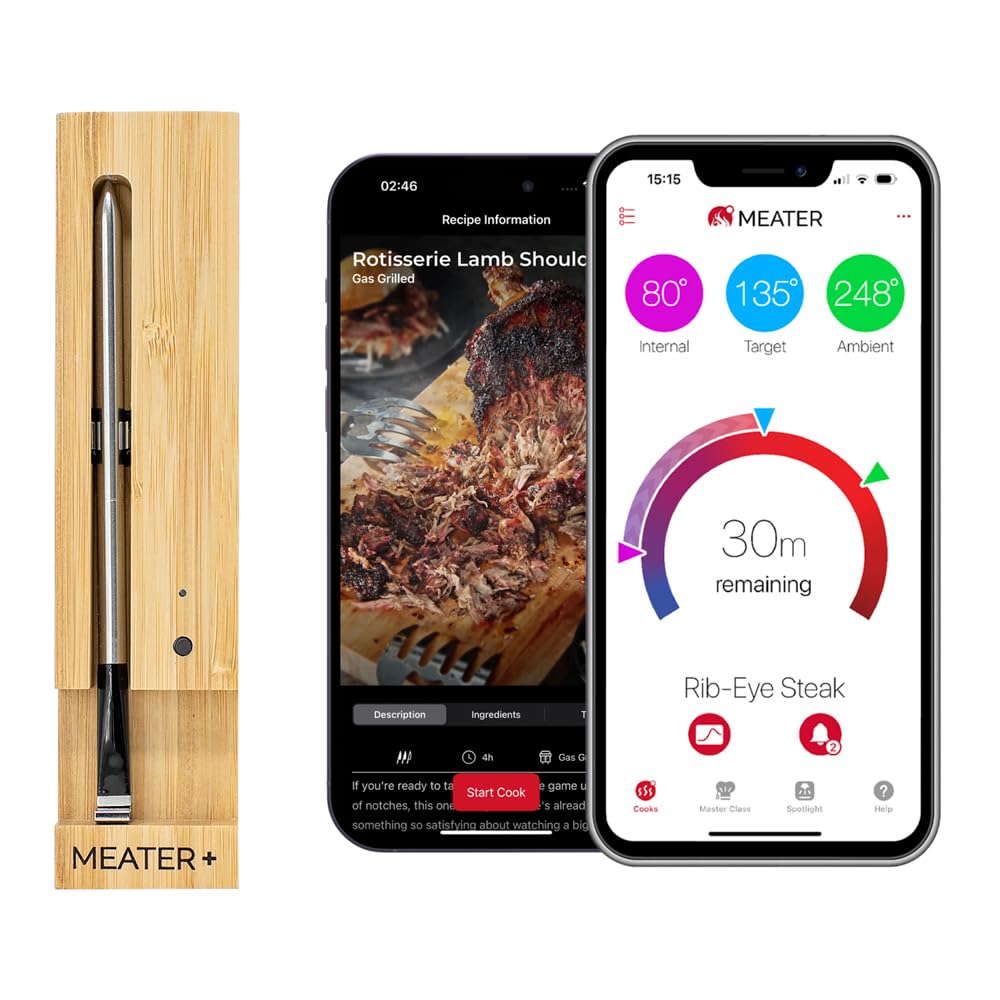
MEATER Plus wireless meat thermometer

I was skeptical about fully wireless probes at first. How is a small stick supposed to hold a Bluetooth signal through a closed smoker lid? After dozens of cooks with the MEATER Plus, the skepticism is gone. The probe goes into the meat. That’s it. No cable dangling near the burners, no transmitter box balanced on the grill shelf, nothing. Your phone shows the temperature in real time from up to 165 feet away.

The app is what really separates the MEATER from cheaper alternatives. Select your protein and target doneness, and it walks you through the cook — including a live estimated finish time that’s accurate enough to actually plan a meal around. The dual sensor reads both internal meat temperature and ambient cook temperature from a single probe, so you’re monitoring your grill’s running temp at the same time without a second thermometer clipped to the grate.

Battery life is roughly 24 hours per charge. The slim bamboo case charges the probe and doubles as a Bluetooth repeater — keep it near the grill and you’ll stay connected reliably well beyond the stated 165 feet. Setup takes about three minutes.

The limitation is one probe per thermometer, meaning one cut at a time. For most home cooks that’s perfectly sufficient. If you’re regularly juggling a brisket and three racks of ribs simultaneously, look at the ThermoPro TP25 or step up to the MEATER Pro Duo. But for straightforward single-cut cooking, nothing beats the MEATER Plus for ease of use.

Pros

  • Completely cable-free — the cleanest setup of any thermometer tested
  • Dual sensor reads meat temp and ambient grill temp simultaneously
  • Guided cook app with live finish time estimates — genuinely useful
  • Bamboo case acts as Bluetooth repeater to extend range
  • Setup under 3 minutes, pairs first time every time

Cons

  • One probe only — one cut at a time
  • Requires app account creation before first use

Bottom line: The best single-probe Bluetooth thermometer on the market. If you’re buying your first wireless thermometer and cook one cut at a time, start here.

Current price: $79.95

See Today’s Price on Amazon →

Want more detail? Read my full MEATER Plus review covering accuracy tests, long-term durability, and how it holds up after two years of regular use.


Inkbird IBT-4XS — Best Budget

Inkbird IBT-4XS bluetooth meat thermometer

The Inkbird IBT-4XS is what you buy when the MEATER price is hard to justify for something you might use a few times a season — and then you end up using it every weekend because four probes for under $50 changes how you cook. Monitoring a pork shoulder, two racks of ribs, and the grill ambient temperature simultaneously on one screen is the kind of thing that used to cost three times this much.

The app does what it needs to: shows all four probe temperatures, lets you set high and low alerts per probe, and keeps a basic temperature history. It’s not pretty and there’s no guided cook mode, but if you already know you want chicken to hit 165°F and pork to reach 203°F for pulled, you don’t need hand-holding. You need a reliable readout, and the Inkbird gives you that.

Range is 150 feet — fine for a typical backyard patio, a bit tight if you want to disappear into the house during a three-hour smoke and forget about it. The probes are corded with 47-inch braided cables, which means something hanging out of your grill. Not a functional problem, just less tidy than MEATER. USB rechargeable, charges in around two hours.

At this price, the Inkbird IBT-4XS is hard to argue against. Start here if you’re new to Bluetooth thermometers and don’t want to commit $100+ until you know how much you’ll actually use one. Most people find they use it constantly.

Pros

  • Four probes for under $50 — the best value in the category
  • All four temps visible on one app screen simultaneously
  • USB rechargeable — no disposable batteries
  • Accurate to ±1.8°F, consistent with models costing three times more
  • Works with iOS and Android

Cons

  • 150-foot range — shorter than the ThermoPro TP25
  • No guided cook mode
  • Corded probes (cables hang out of grill)

Bottom line: Four probes for under $50. If you cook for a group and want to monitor multiple cuts without spending a lot, the Inkbird IBT-4XS is the obvious starting point.

Current price: $49.99

See Today’s Price on Amazon →

Read more: Inkbird IBT-4XS full review — including side-by-side accuracy tests and a full app walkthrough.


ThermoPro TP25 — Best Multi-Probe

ThermoPro TP25 bluetooth meat thermometer

The spec that makes the ThermoPro TP25 worth attention is 650 feet of Bluetooth range. Most Bluetooth thermometers drop signal the moment you’re two rooms inside your house. The TP25 stays connected from the other side of a large garden, through walls, across multiple floors. For long overnight cooks — a brisket running 14 hours, a pork shoulder going low and slow all day — that range means you can actually get on with things instead of hovering near the grill.

Four probes, USB rechargeable, 90 hours of battery life. At $42.99 it’s actually cheaper than the Inkbird IBT-4XS but adds 500 feet of extra range and a noticeably more polished app. It also undercuts the Weber iGrill 3 by $67 while matching it on probe count and beating it on range. For anyone doing serious BBQ, it’s the most sensible value proposition in the lineup.

The app shows all four probes simultaneously with individual alert thresholds per probe. Temperature history is recorded for the full cook, which is useful for reviewing and improving your process. ThermoPro’s software is mature — they’ve been in the thermometer market long enough that the app is stable and well-maintained, not a buggy afterthought.

What’s missing: guided cook mode (you set your own target temps) and wireless probes — cables come with the unit. For experienced BBQ cooks, neither of those is a meaningful limitation. For beginners who want more guidance, the MEATER Plus is the more forgiving starting point.

Pros

  • 650-foot Bluetooth range — the best of any model tested, by far
  • Four probes for $42.99 — $67 less than the Weber iGrill 3
  • 90-hour battery life on a single USB charge
  • Mature, stable app with per-probe alerts and cook history
  • Accurate to ±1.8°F

Cons

  • No guided cook mode — you need to know your target temps
  • Corded probes
  • App less visually polished than MEATER

Bottom line: The best choice for serious BBQ cooks who monitor multiple cuts over long distances. That 650-foot range is genuinely in a different league.

Current price: $42.99

See Today’s Price on Amazon →

MEATER Pro Duo — Best Premium

MEATER Pro Duo wireless meat thermometer

$179.95. That’s the number to sit with before reading anything else about the MEATER Pro Duo. If the price makes sense to you — because you regularly cook multiple large proteins, you do long weekend smokes, you take this seriously — then it absolutely delivers. If it doesn’t, the MEATER Plus at $79.95 does the job for single cuts at less than half the price.

Two completely wireless probes, six sensors each, 1000°F heat resistance. That heat resistance figure matters more than it sounds. Standard probe tips start degrading above 700°F — over high-heat charcoal or live fire, you’ll eventually see accuracy drift on cheaper probes. The MEATER Pro Duo handles those temperatures without issue, which means it’ll outlast standard probes if you cook hot.

The six sensors per probe (three internal, three ambient) give the MEATER app significantly more data to work with. Stall detection during long brisket cooks is noticeably better than on cheaper thermometers — the estimated finish time updates intelligently as the stall extends rather than just counting down optimistically. Running two independent guided cook modes simultaneously works seamlessly: one probe tracking a brisket to 203°F, the other watching a chicken to 165°F, each with its own alerts and countdown.

Worth noting: if you’re deciding between the Pro Duo and the original MEATER Plus, I’ve done a detailed MEATER Plus vs MEATER Pro Duo comparison that covers every difference. The short version — if you cook two proteins simultaneously at least once a month, the Pro Duo earns its price. If you don’t, the Plus is the smarter buy.

Pros

  • Two fully wireless probes — no cables anywhere
  • 1000°F heat resistance for charcoal and live-fire cooking
  • Six sensors per probe for stall detection and accurate time estimates
  • Two simultaneous guided cook modes in the MEATER app
  • Best build quality of any thermometer in this roundup

Cons

  • Expensive — $179.95 is a significant outlay
  • Only two probes; ThermoPro TP25 offers four for $43
  • Overkill if you cook one protein at a time

Bottom line: The best wireless thermometer for cooks who regularly handle two large cuts simultaneously. The 1000°F heat resistance and stall detection justify the price for serious BBQ. Everyone else should look at the MEATER Plus.

Current price: $179.95

See Today’s Price on Amazon →

Weber iGrill 3 — Best for Weber Grill Owners

Weber iGrill 3 bluetooth meat thermometer

If you own a Weber Spirit, Genesis, or Summit grill, the iGrill 3 does something no other thermometer on this list can: it clips directly onto the side table via a Weber-specific bracket and looks like it was built for the grill, because it was. That native integration is either completely irrelevant to you — in which case, buy the ThermoPro TP25 for $67 less — or it’s exactly what you’re after.

Four-probe capacity covers a full grill. The Weber Grills app handles temperature monitoring clearly and, on compatible connected Weber smart grills, pulls grill settings and food temps into one screen. The 250-hour battery life on AAA batteries means you essentially never think about it between sessions — no charging, no checking, just replace the batteries a couple of times a year.

The honest assessment: in pure thermometer terms, the ThermoPro TP25 at $42.99 matches the iGrill 3 on probe count, beats it on Bluetooth range, and costs $67 less. The iGrill 3’s value is entirely about Weber ecosystem fit. The mounting system, the Weber app integration, the feeling that your setup is intentional rather than cobbled together — if those things matter to you, the premium makes sense.

At $109.99 it’s not cheap for what it does. But Weber owners tend to be Weber owners for life, and the iGrill 3 is the right thermometer for that grill.

Pros

  • Designed specifically for Weber grills with native bracket mount
  • 250-hour battery life — forget about it between seasons
  • Four-probe capacity
  • Integrates with Weber connected grills for combined monitoring
  • 4.6 stars across thousands of verified reviews

Cons

  • Expensive compared to ThermoPro TP25 for equivalent probe count
  • Much less useful without a compatible Weber grill
  • AAA batteries rather than USB rechargeable

Bottom line: If you have a Weber grill and want a thermometer that feels factory-fitted, the iGrill 3 is exactly that. For everyone else, the ThermoPro TP25 delivers similar specs at $67 less.

Current price: $109.99

See Today’s Price on Amazon →

What to Look For

Wired vs Wireless Probes

Most Bluetooth thermometers use corded probes — a metal tip connected by a braided heat-resistant cable to a transmitter outside the grill. MEATER’s probes are fully wireless, with no cable at all. Wireless is tidier and removes any risk of cables near flames, but costs more per probe. Corded designs are just as accurate and significantly more affordable — the Inkbird and ThermoPro in this list both use corded probes to excellent effect.

How Many Probes Do You Actually Need?

Honestly, most home cooks do one thing at a time: a roast chicken, a steak, a pork shoulder. One probe handles all of that. You only need multiple probes if you’re regularly cooking two or more large proteins simultaneously, or if you want to use one probe for meat temperature and another for grill ambient temperature separately. If you’re not sure, start with one probe — you can always upgrade.

Bluetooth Range

This is where cheap thermometers cut corners. A 30-foot range means you’re essentially tethered to the grill — fine for a quick steak, useless for a six-hour rib session where you want to watch TV inside. Anything above 150 feet is workable for a typical backyard. The ThermoPro TP25’s 650 feet is genuinely impressive and changes what’s practically possible. Metal smoker bodies reduce effective range, so build in some headroom.

App Quality

You’ll interact with the app far more than the hardware, so don’t underestimate it. MEATER’s app is the clear leader — guided cook modes with live finish time estimates that actually work. ThermoPro and Inkbird apps are reliable and functional but won’t hold your hand. Weber’s app works best within the Weber ecosystem. For beginners, app quality matters more than any hardware spec.

Battery Life

USB rechargeable beats disposable batteries for regular use. MEATER charges via its bamboo case. The ThermoPro TP25 gives 90 hours from a single USB charge. The Weber iGrill 3 uses AAA batteries but lasts 250 hours, so you’re not replacing them often. For overnight or multi-day cooks, battery capacity matters — the Inkbird’s shorter battery life is worth checking before a long session.


How I Tested

Each thermometer in this list was used across multiple real cooks: at minimum a whole chicken, a low-and-slow pork shoulder or ribs, and at least one high-heat steak session. I tested Bluetooth range by walking away from the grill in measured increments until signal dropped. App experience was assessed across the full cook — from initial setup and pairing through to end-of-cook data review.

Temperature accuracy was checked at multiple points during each cook against a calibrated reference thermometer. All five models came within 2°F of the reference reading at every check. I also paid attention to probe durability over repeated use, focusing on cable integrity on corded models and probe tip condition on the wireless MEATER units after exposure to high heat.

No products were provided free of charge by manufacturers. All thermometers were purchased at standard retail prices.


Frequently Asked Questions

What is the difference between Bluetooth and Wi-Fi meat thermometers?

Bluetooth thermometers connect directly to your phone within range — typically 30 to 650 feet. Wi-Fi thermometers connect to your home network, so you can check temperatures from anywhere with internet, including away from home. Wi-Fi models cost more and need router setup. For backyard cooking where you stay within range, Bluetooth is better value. If you travel and want to monitor a slow cooker remotely, Wi-Fi is worth the premium.

How accurate are Bluetooth meat thermometers?

Accurate enough. Most quality models are rated to ±1.8°F, which is more than sufficient for cooking. The MEATER Plus is rated to ±0.5°C (about ±0.9°F). In practice, the bigger source of error is probe placement rather than thermometer accuracy — always insert into the thickest part of the meat, well away from bone or fat pockets.

Can I leave the probe in the meat the whole time it cooks?

Yes — that’s the whole point. Leave-in thermometers are designed to stay in the meat throughout the cook. All five models in this list handle sustained high temperatures well within cooking ranges. Just don’t put probes in a dishwasher, submerge the transmitter unit in water, or use a standard probe in a 1000°F pizza oven. The MEATER Pro Duo’s 1000°F rating is there specifically for extreme heat situations.

What is the best Bluetooth thermometer for a beginner?

The MEATER Plus, without hesitation. The guided cook app removes all the guesswork — you pick the protein and doneness, it tells you exactly what to do and when you’re done. The wireless design also means no cable to route under a grill lid, which is one less thing to get wrong on your first few cooks. Once you’re comfortable, you can explore manual temperature targets and customise from there.

Do Bluetooth thermometers work in a smoker?

Yes, all of them do. The thing to watch is range — metal smoker bodies are particularly good at blocking Bluetooth signals. The ThermoPro TP25’s 650-foot headroom helps significantly. With MEATER, position the bamboo case (the Bluetooth repeater) close to the smoker rather than across the garden. All five models handle the temperature ranges and extended cook times that smoking requires.

How do I clean the probes?

Wipe with a damp cloth immediately after use, while the probe is still warm. Never submerge the probe body or put it in a dishwasher. The tip can be sanitised with a small amount of isopropyl alcohol on a cloth. For corded models, be careful not to get water into the junction where probe meets cable — that’s the most common failure point on cheap thermometers. Dry thoroughly before storing.

Are these thermometers accurate enough for food safety?

Yes. The USDA target temps — 165°F for poultry, 145°F for whole muscle beef and pork with a 3-minute rest, 160°F for ground meat — are well within the measurement range of all five models here. At ±1.8°F accuracy, you have more than enough precision for safe cooking. Use common sense: check in the thickest part of the meat, not near bone, and don’t rely on a single reading if something seems off.


Related Reading

Looking for more detail on a specific model? I cover several of these thermometers in dedicated long-form reviews:

  • MEATER Plus Wireless Meat Thermometer Review — deep dive on accuracy, app, and long-term durability after two years
  • Original MEATER Review — how the entry-level model compares to the Plus
  • Inkbird IBT-4XS Review — full breakdown of the best budget four-probe thermometer
  • MEATER Plus vs MEATER Pro Duo — detailed head-to-head if you’re deciding between the two MEATER models
  • Guide to Buying Outdoor Cooking Equipment — where thermometers fit in a full BBQ setup
  • Meat Thermometers: Reviews & Buying Guide
  • Best Sous Vide Precision Cookers — set-and-hold temperature instead of monitoring it

My Verdict

For most home cooks, the MEATER Plus is the one to buy. The cable-free design, outstanding app, and genuine ease of use make it the right answer for anyone cooking one cut at a time — which is most people, most of the time. If budget is the main constraint, the Inkbird IBT-4XS gives you four probes for under $50, which is remarkable value. Serious multi-cut BBQ sessions are best served by the ThermoPro TP25, whose 650-foot range is in a different league from everything else at this price. Weber grill owners will find the iGrill 3‘s native integration worth the premium, and dedicated BBQ enthusiasts who want the ultimate wireless setup should look at the MEATER Pro Duo.

Filed Under: Product Reviews

  • « Go to Previous Page
  • Page 1
  • Interim pages omitted …
  • Page 4
  • Page 5
  • Page 6
  • Page 7
  • Page 8
  • Interim pages omitted …
  • Page 25
  • Go to Next Page »

Recent Articles

  • Nama J2 Review: You Are Paying for Time, Not More Juice
  • Omega Cold Press Juicer Review: Great for Greens, Confusing to Buy
  • Breville JE98XL Review: Fast on Fruit, Hopeless on Greens
  • Ninja NeverClog JC151 Review: Great at Greens, Weak at Carrots
  • Masticating vs Centrifugal Juicer: Which Should You Buy?

Search


HOME          Contact          Affiliate Disclosure          Terms of Service          Privacy Policy


kitchenwarecompare.com is a participant in the Amazon Services LLC Associates Program, an affiliate advertising program designed to provide a means for sites to earn advertising fees by advertising and linking to Amazon.com, Endless.com, MYHABIT.com, SmallParts.com, or AmazonWireless.com. Amazon, the Amazon logo, AmazonSupply, and the AmazonSupply logo are trademarks of Amazon.com, Inc. or its affiliates. As an Amazon Associate we earn from qualifying purchases.


Copyright © 2026 kitchenwarecompare.com, ALL RIGHTS RESERVED.