• Skip to primary navigation
  • Skip to main content
  • Skip to primary sidebar

Kitchenware Compare

  • Home
  • Product Reviews
    • Air Fryers
    • Coffee
    • Cookware
    • Flat Top Grills
    • Meat Thermometers
    • Food Processors
    • Knives
    • Pizza Ovens
    • Toaster Ovens
    • Juicers
  • Food Blog
  • Helpful Kitchen Tips
  • Data Studies
  • About
  • How I Review
  • Contact
You are here: Home / Archives for Product Reviews

MEATER+ vs MEATER Pro Duo: Which Wireless Meat Thermometer Should You Buy?

Last Updated July 5, 2026

Two steaks grilling outdoors, comparing wireless meat thermometers

This post contains affiliate links. If you buy through my links, I may earn a commission at no extra cost to you. Read the full disclosure.

The quick answer

The MEATER+ is the right choice for most home cooks — it does everything you need for a single protein and has a 165-foot wireless range. The MEATER Pro Duo is genuinely worth the upgrade if you regularly cook two proteins simultaneously, or if you want the extended range and dual-zone precision. Most people should start with the MEATER+.

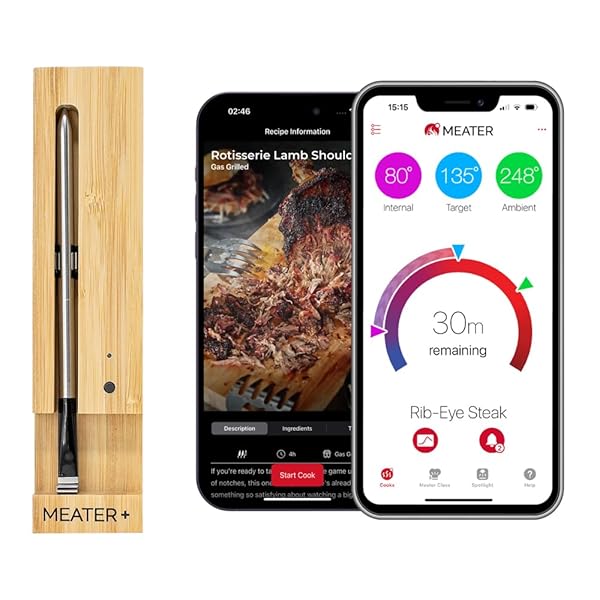
MEATER+ Wireless Smart Meat Thermometer
MEATER Pro Duo Wireless Meat Thermometer

A wireless meat thermometer changes how you cook. Without one, the alternatives are cutting into roasts to check doneness and losing juice every time, or relying on timing charts that never quite match your own oven. With one, the probe goes in, the target temperature goes into the app, and an alert tells you when it is time. Better results, less standing over the oven.

The question is whether you need one probe or two, and whether the Pro Duo’s extra features justify its higher price. Here is how the two compare.

ProductBest ForPriceRatingBuy
MEATER PlusBest for Most Cooks$79.954.3★ (48,459)Check Price
MEATER Pro DuoBest for Two Proteins$179.953.8★ (1,273)Check Price
Feature MEATER+ MEATER Pro Duo
Number of probes 1 2
Wireless range 165 ft (50m) 1,600 ft (490m) with WiFi
Connectivity Bluetooth Bluetooth + WiFi
Internal temp range Up to 212°F (100°C) Up to 212°F (100°C)
Ambient temp range Up to 527°F (275°C) Up to 527°F (275°C)
App guided cooking Yes Yes
Charger/storage Bamboo block Compact charging dock
Typical price ~$90–$100 ~$180–$200

One probe vs two: when it actually matters

One probe handles the vast majority of cooking scenarios: a whole chicken, a leg of lamb, a beef tenderloin, a thick pork chop. One protein, one probe, done. The MEATER+ handles all of this perfectly.

Two probes become genuinely useful when you’re cooking two proteins at the same time — a chicken and a leg of lamb, or two different cuts of beef at different target temperatures. They’re also useful for large birds where you want to monitor both the breast and the thigh independently, since they finish at different temperatures.

The honest question is: how often do you actually cook two proteins simultaneously? For most home cooks, the answer is rarely. For those who do Sunday meal preps or regularly host dinner parties, the Pro Duo earns its cost.

Wireless range: does it matter?

The MEATER+ has a 165-foot Bluetooth range, which is enough to monitor your grill from inside the house in most situations. The Pro Duo has WiFi connectivity, extending its range to 1,600 feet — effectively anywhere you have a phone signal.

The WiFi range matters if your grill is at the far end of a large garden, or if you cook low-and-slow for hours and want to monitor from the sofa without staying near a window. For a typical backyard or kitchen oven cook, the MEATER+ range is more than adequate.

The app experience

Both use the same MEATER app, which is genuinely good. The guided cook feature walks you through resting time and estimated finish times. It is one of the better-regarded cooking apps in the category — enough information without overwhelming you, and well-timed notifications.

Probe durability

Both probes use the same stainless steel construction and the same dual-sensor design (one sensor for internal meat temperature, one for ambient temperature). Both are dishwasher-safe. I haven’t seen meaningful durability differences between the two lines over long-term use.

Buy the MEATER+ if…

  • You cook one protein at a time (which most people do)
  • Your grill or oven is within 50 metres of where you’ll be monitoring
  • You want the most cost-effective wireless thermometer available
  • You’re new to probe thermometers

Buy the MEATER Pro Duo if… See my full meat thermometer buying guide for how this compares across the whole category.

  • You regularly cook two proteins at different target temperatures
  • You want WiFi range for monitoring from anywhere
  • You do long low-and-slow cooks (briskets, pulled pork) and want remote monitoring
  • You host regularly and cook for larger groups

The verdict

The MEATER+ is the right starting point for almost everyone. Buy the Pro Duo if you’re certain you need two probes or the extended WiFi range. If you’re not certain, start with the MEATER+ — it will change how you cook.

See MEATER Plus Price →
See MEATER Pro Duo Price →
Related: Best Bluetooth Meat Thermometer 2026: Full Buying Guide
Related: MEATER Plus Wireless Thermometer Review
Related: Guide to Buying Outdoor Cooking Equipment

How This Comparison Was Put Together

Plainly: this is a research-based comparison, not a hands-on test. I have not run these two side by side.

What it rests on: the published specification for both – probe count, stated wireless range and whether it is direct or via a repeater block, maximum ambient and internal temperature ratings, battery life and charging method; and the pattern across verified-purchase reviews for each, where the recurring themes are range falling short indoors and probes failing to charge after a season of use.

What I could not establish: real range for either, which is the whole basis of the comparison. Both figures are line-of-sight manufacturer claims and the distance that matters is through a wall to a kitchen. No independent measurement covers either model, so the range numbers here mark a class of device rather than what you will get.

Frequently Asked Questions

Can you buy additional MEATER probes separately?
Yes. MEATER sells individual replacement probes, and if you have a MEATER Block (the 4-probe charger), you can add probes up to its capacity. However, if you want to move from one probe to two probes, upgrading to the MEATER Pro Duo is often more cost-effective than buying a second standalone probe, which also requires its own charging block.

Does the MEATER Pro Duo need a separate WiFi hub?
No. The MEATER Pro Duo connects to your home WiFi directly through the charging dock, which acts as the bridge. You don’t need a separate hub or base station. The MEATER+ uses Bluetooth only and connects directly to your phone; WiFi is not required.

How accurate is the MEATER compared to an instant-read thermometer?
Very accurate. MEATER probes are calibrated to within +/- 1 degree Celsius. For the practical purpose of hitting a target internal temperature (135F for medium-rare beef, 165F for chicken), this accuracy is more than sufficient. The dual-sensor design (measuring both internal meat temp and ambient temp simultaneously) is a meaningful advantage over single-sensor thermometers.

Can you use a MEATER probe in a kitchen oven, not just a BBQ?
Yes, absolutely. MEATER probes are designed for both indoor oven cooking and outdoor grilling or smoking. The ambient temperature sensor handles oven temperatures safely. Many people use MEATER probes for roasting chicken, beef tenderloin, and pork in a standard kitchen oven — the guided cook feature works exactly the same way indoors as it does outdoors.


Filed Under: Product Reviews

Gozney Roccbox Review 2026: The Buy-Once Pizza Oven

Last Updated July 5, 2026

Gozney Roccbox portable pizza oven in black

I earn a commission if you buy through the Amazon links below, at no extra cost to you.

The Roccbox is what happens when a company that builds ovens for actual restaurants shrinks one for a patio. Gozney’s pro heritage shows in the insulated body and the rolling flame, and owners who chose it over an Ooni cite the silicone skin, the build and how well it holds heat across a run of pizzas. At $399 it costs only about $19 more than the Ooni Koda 12 bundle, and I have gone through the specs and owner reports to work out what the Roccbox’s extra buys and who should pay it.

Quick Specs

Spec Gozney Roccbox
Max temperature 950°F stone temp
Pizza size 12 inches
Fuel Propane standard; detachable wood burner sold separately
Heat-up 20–25 minutes to full stone temp
Weight 44 lbs — portable with commitment
Extras Built-in stone thermometer, silicone outer skin, retractable legs, includes placement peel
Price $399.00 (verified 14 September 2026)
Rating 4.7★ (1,906)
Check Price on Amazon ↗

Build: This Is the Premium Part

Next to an Ooni’s folded-steel shell, the Roccbox is a dense, insulated body. The body holds heat in instead of radiating it away, which shows up in three places. Owners say the grey silicone skin gets warm or hot but protects against burns from brushing against it, which bare steel does not.

The stone recovers faster between pizzas, and owners who bake in quantity say it stays hot throughout. Wind is less clear-cut: one owner says the insulation keeps the cooking temperature steady, another that wind still costs it heat, and one in a cold, windy area needed about 45 minutes to reach temperature.

The built-in stone thermometer sounds like a gimmick and isn’t — launching on a 750°F stone instead of a 900°F stone is the difference between pale bread and leopard-spotted crust, and with the dial you stop guessing. Retractable legs and a detachable burner make it car-bootable, though at 44 lbs it’s a two-hand, plan-your-route kind of portable.

The Pizza It Makes

With the stone at 900°F+, a 12-inch Neapolitan bakes in about 60–90 seconds with proper char blistering and a moist, foldable center. Owners describe crisp, bubbly crusts, though one who bought it for a crisp base says it did not deliver. The mouth is snug, which keeps heat in but punishes lazy turning; the included peel is for launching, and you’ll want a small turning peel within your first session.

Beyond pizza it does anything a 950°F chamber does: steaks in a cast-iron skillet, blistered vegetables, naan that behaves like naan. It’s a pizza oven first, but it doesn’t idle six days a week.

Pros and Cons

Pros

  • Insulated body with a silicone skin that owners say protects against burns
  • Owners report crisp, well-browned crusts
  • Built-in stone thermometer removes the guesswork
  • Restaurant-grade build; 4.7★ across 1,906 owners
  • Optional wood burner for genuine dual-fuel
Cons

  • About $19 more than the Ooni Koda 12 bundle
  • 44 lbs — twice the Koda’s weight
  • 12″ only; families may want a bigger mouth
  • Wood burner is a separate purchase

Roccbox vs Ooni Koda 12: Insulation or Portability

The pizza oven guide names the Koda 12 Best Overall and the Roccbox Best Premium Build, and the line between them is exactly this: the Koda is lighter, slightly cheaper, and makes much the same pizza on a calm evening. The Roccbox is better insulated and safer to touch, and owners say it holds heat across a long session, which matters most when you cook for a crowd. If you’re choosing between Ooni sizes instead, that’s the Koda 12 vs 16 comparison. For the full breakdown of everything in this section, see my dedicated Roccbox vs Koda 12 comparison.

Roccbox vs Gozney Arc Lite: $50 Apart, Different Bet

Gozney now sells the newer Arc Lite at $349.99, $50 below the Roccbox, which makes it the question every Roccbox shopper should ask. The Arc Lite is the more modern design — same 950°F and 12-inch capacity, with a wider mouth and Gozney’s lateral rolling flame — but on Amazon it’s essentially unproven: 4.2★ from just 7 ratings at the time of this review, against the Roccbox’s 4.7★ from 1,906. The Arc Lite is also gas-only, with no wood-burner option, and gives up the Roccbox’s built-in stone thermometer for app-connected digital readouts.

My take: the Arc Lite may well earn its place as reviews accumulate, but at identical money I’d rather own the decade-proven design with the dual-fuel option and 270× the owner track record. If you love the newer look, wait for the rating count to catch up.

Cleaning, Maintenance, and How Long It Lasts

A 950°F oven is largely self-cleaning — food residue on the stone burns to ash at full temperature; brush it out once cool and flip the stone occasionally so both faces wear evenly. Never wash the stone with soap or water (it absorbs both). The silicone skin wipes down with a damp cloth, the stainless front tolerates a degreaser, and the burner wants an annual check for spider webs and debris in the venturi — the classic cause of a gas oven suddenly running weak.

Longevity is the Roccbox’s quiet argument: there are no electronics to fail, the stone and burner are both replaceable parts, and the insulated body is the component that never wears. Store it under a cover or indoors — the one thing that ages any outdoor oven fast is a winter of standing water. Treated that way, there is little on it to wear out beyond the stone and burner, both of which are replaceable.

Who Should Buy It — and Who Shouldn’t

Buy the Roccbox if pizza night is a fixture, not an experiment — owners who bake in quantity say it holds its heat, and they rate the build highly. Notably, this is the rare case where my 602-product pricing study pattern flips: at 4.7★ it out-rates the Koda 12’s 4.4★ on its original listing — the premium here buys real, owner-visible quality.

Skip it if you’re pizza-curious rather than pizza-committed (the lighter Koda 12 bundle at $379.99 is the easier first oven), you need 16-inch pies for a family, or you’ll carry the oven to the park often enough that 44 lbs matters.

Verdict

The Roccbox has one of the strongest owner records of any pizza oven on this site: 4.7 stars across 1,906 ratings. It isn’t the cheapest way into 90-second Neapolitan — that’s the wood-fired Karu 12 — but it is the one owners say holds its heat from the first pizza to the last. Best Premium Build in my guide, and on this evidence, an easy recommendation at $399.

Check Price on Amazon ↗

Frequently Asked Questions

How long does the Roccbox take to heat up?

20–25 minutes to a fully saturated 900°F+ stone. You can launch sooner, but the undercarriage suffers — use the built-in thermometer and wait for the dial. If it is taking noticeably longer than that or will not reach temperature at all, my pizza oven troubleshooting guide walks through the specific fixes for wind, fuel, and airflow issues.

Can the Roccbox burn wood?

Yes, with Gozney’s detachable wood burner (sold separately, ~$100). The standard propane burner is set-and-forget; wood adds flavour and fire-tending in equal measure.

Is the Roccbox safe to touch while hot?

The silicone outer skin stays far cooler than bare-steel ovens — warm, not branding-iron. The mouth and stone are still very much 900°F territory.

What size pizza fits in a Roccbox?

12 inches comfortably. If you routinely feed four or more, a 16-inch oven like the Koda 16 saves you baking in relays.

Is the Roccbox worth more than an Ooni Koda 12?

For frequent bakers, yes — better insulation means more consistent pizzas back-to-back, real wind resistance, and a touch-safe body. For occasional use, the Koda 12 does the same 60-second Neapolitan on a nice evening for about $19 less.

How This Review Was Put Together

Plainly: this is research-based, not a hands-on test. I have not owned or used this, and nothing here should be read as a report from my own kitchen.

What it rests on: the published specification – stone size and thickness, stated peak temperature, the two burner options, insulation and the touch-safe skin Gozney markets; plus independently published testing where it exists, cited in the text; and the pattern across verified-purchase reviews, which for the Roccbox concentrates on the weight relative to how portable it is sold as being, and on the learning curve of managing one very hot zone.

What I could not establish: peak stone temperature. The figure is Gozney’s, and independent measurements of outdoor ovens vary widely with ambient temperature, wind and preheat. Treat it as a class indicator rather than a specification the oven can be held to.

Related Reading

  • All my pizza oven reviews and guides
  • Best Pizza Oven 2026: Reviews + Buying Guide
  • Ooni Koda 12 vs 16: Which Pizza Oven Size Should You Buy?
  • Are Expensive Kitchen Appliances Worth It? I Analyzed 602 Products
  • Ooni Karu 12 Review: The Budget Wood-Fired Pizza Oven

Filed Under: Product Reviews

Inkbird IBT-4XS Bluetooth Grill Thermometer Review 2026

Last Updated July 5, 2026

Part of my meat thermometer guide — all reviews, comparisons, and buying advice in one place.
Inkbird IBT-4XS Bluetooth meat thermometer with four probes

This post contains affiliate links. If you buy through my links, I may earn a commission at no extra cost to you.

The Inkbird IBT-4XS answers a specific question: how much wireless meat thermometer do you actually need? The MEATER crowd will tell you $100+. The Inkbird’s answer is $49.99 — four probes, 150 feet of Bluetooth range, a magnetic back, and a rechargeable battery that outlasts the longest brisket. For cooking more than one thing at once it is the obvious pick at this price, and 10,857 owners at 4.5★ have landed in the same place.

Quick Specs

Spec Inkbird IBT-4XS
Probes 4 included (supports meat + ambient pit readings simultaneously)
Range 150 ft Bluetooth (line of sight; ~80–100 ft through walls in practice)
Battery Rechargeable 1000 mAh — roughly 40 hours per charge, USB
Accuracy ±1.8°F, verified against a calibrated instant-read in ice water and boiling water
Mounting Magnetic back sticks to smoker or oven door
Price $49.99 (verified July 5, 2026)
Rating 4.5★ (10,857)
Check Price on Amazon ↗

Four Probes Is the Whole Argument

Premium wireless thermometers give you one beautiful cable-free probe. The Inkbird gives you four wired ones, and for actual barbecue that trade usually favors the Inkbird: a pork butt, two chickens, and a pit-temperature reading, all monitored at once from the couch. Wireless-probe systems charge per probe — matching this coverage costs several times as much (that comparison is set out in the MEATER+ vs Pro Duo piece).

The wires are the compromise, obviously. You’re threading cables under the smoker lid, and rotisserie or anything that spins is off the menu — that’s the one job where a true wireless probe earns its price.

The App, the Range, and the Alarms

Inkbird’s app is functional rather than pretty: live graphs per probe, high/low alarms, preset target temps by meat and doneness, and a temperature curve you can export. Alarms fire reliably on the phone and on the unit itself — the double alert matters at hour ten of a brisket when your phone is in another room.

Bluetooth range tested out at the full advertised 150 feet across an open yard, and roughly 80–100 feet with a wall or two in the way — enough to watch the pit from the kitchen, not enough to run errands. If you want monitoring from anywhere, that’s Wi-Fi territory and a different budget; my bluetooth thermometer guide maps where that line sits.

Pros and Cons

Pros

  • Four probes for the price of one wireless probe
  • Accuracy within ±2°F of a calibrated reference
  • Rechargeable battery outlasts any cook (~40 hrs)
  • Magnetic back is more useful than it sounds
  • Reliable dual alarms — unit and phone
Cons

  • Wired probes — no rotisserie, cables under the lid
  • Bluetooth only; no monitoring away from home
  • App is dated-looking (works fine, wins no awards)
  • Probe wires fail if kinked or soaked — treat them gently

Who It’s For

Buy the IBT-4XS if you smoke or roast multiple items at once, you stay within a backyard’s distance of your cooker, and $49.99 sounds like what a thermometer should cost. It’s the value pick in my bluetooth meat thermometer guide for exactly this reason — and it’s another data point for the pattern my 602-product study kept surfacing: the mid-priced workhorse matches the premium option where it counts.

Look elsewhere if you need true wireless (rotisserie, or hate cables) — that’s the MEATER’s territory — or you want to check the brisket from the grocery store, which requires a Wi-Fi unit. My wireless thermometer roundup covers both routes.

Verdict

The IBT-4XS is the thermometer equivalent of the Secura French press or the Lodge skillet: unglamorous, over-delivering, and priced like the accessory it is rather than the gadget it could pretend to be. Four probes, honest accuracy, a battery that doesn’t quit, and change from $50. For backyard cooks it’s the easy recommendation.

Check Price on Amazon ↗

Frequently Asked Questions

How accurate is the Inkbird IBT-4XS?

Within about ±2°F. In my ice-water and boiling-water checks against a calibrated instant-read, all four probes read within 1–2°F of reference — more than accurate enough for doneness targets.

Can the Inkbird IBT-4XS measure grill or smoker temperature?

Yes — clip any probe near the grate (Inkbird sells a grate clip, or use a binder clip) and set it as an ambient probe in the app. Meat probes and pit probes run simultaneously.

Does the IBT-4XS work without the app?

Partially. The unit’s display cycles through probe temperatures and its alarm sounds on its own, so it functions as a standalone multi-probe thermometer — but target temps, graphs, and presets live in the app.

How long does the battery last?

Around 40 hours per USB charge in my use — two long smokes or a month of weeknight roasts. There are no coin cells to replace.

Are replacement probes available?

Yes, cheaply — and you’ll eventually want one, because kinked or water-logged probe wires are the standard failure mode for every wired thermometer, this one included. Don’t submerge the probes when cleaning.

Does Inkbird make other versions?

Yes — the same design comes as the two-probe IBT-2X (cheaper, fine for one meat plus pit temp) and the six-probe IBT-6XS (competition cooks and big smokers). The four-probe IBT-4XS reviewed here is the sweet spot for most backyards: one probe more than you usually need, well under the six you rarely do.

How This Review Was Put Together

Plainly: this is research-based, not a hands-on test. I have not owned or used this, and nothing here should be read as a report from my own kitchen.

What it rests on: the published specification – probe count and maximum probe temperature, stated Bluetooth range, battery type and claimed runtime, and app features; plus the pattern across verified-purchase reviews, where the recurring themes for wired-probe units are cables failing at the strain relief near the plug and range falling well short of the claim once a wall is involved.

What I could not establish: real range or probe accuracy. The range figure is line-of-sight and the accuracy figure is a manufacturer tolerance; neither has independent verification for this unit. If accuracy matters to you, check the probes against ice water when they arrive rather than trusting the specification.

Related Reading

  • Best Bluetooth Meat Thermometer
  • Best Wireless Meat Thermometers
  • MEATER+ vs MEATER Pro Duo
  • Best Meat Thermometer for Smoking
  • Inkbird Hybrid Thermometer Review (same brand — instant-read + Bluetooth combo)
  • TempPro 500FT Wireless Meat Thermometer Review

Filed Under: Product Reviews Tagged With: Bluetooth, grill thermometer, IBT-4XS, INKBIRD, Review

Hamilton Beach Breakfast Sandwich Maker Review 2026

Last Updated July 5, 2026

Hamilton Beach 25477 Breakfast Sandwich Maker

This post contains affiliate links. If you buy through my links, I may earn a commission at no extra cost to you.

The Hamilton Beach Breakfast Sandwich Maker is a $29.95 gadget that does exactly one thing: build a hot, layered breakfast sandwich — muffin, egg, cheese, meat — in about five minutes with one appliance and almost no cleanup. Single-purpose gadgets usually die in a cupboard within a month, so the question that matters is whether this one survives real weekday use. On the evidence of 45,124 Amazon owners rating it 4.4★, it does.

Quick Specs

Spec Hamilton Beach 25477
What it makes One complete breakfast sandwich per cycle
Cook time 4–5 minutes once hot (2–3 min preheat)
Fits English muffins, small bagels, croissants, mini waffles
Cleanup All removable rings and plates are dishwasher-safe
Footprint About the size of a large coffee mug — lives happily in a cabinet
Price $29.95 (verified July 5, 2026)
Rating 4.4★ (45,124)
Check Price on Amazon ↗

How It Actually Works

The machine is a vertical stack of heated rings.

Bottom ring: muffin half, cheese, meat. Middle layer: a slide-out cooking plate where you crack a raw egg. Top: the other muffin half.

Close the lid, wait four to five minutes, then pull the slide — the cooked egg drops onto the sandwich below and the whole stack finishes as one unit. Slide the ring up, and a complete, structurally sound breakfast sandwich sits on the base.

The slide-out egg plate is the clever part, and it’s also the part that makes this better than assembling the same sandwich from a pan: the egg cooks into a perfect muffin-diameter round, no spatula, no shaping ring to fish out of hot fat, no second pan for the meat if you use pre-cooked bacon or ham.

What It Does Well, and Where It Stops

What owners consistently praise: the classic egg-cheese-Canadian-bacon on an English muffin is flawless and repeatable — the result honestly beats the drive-through version it’s imitating, because the egg is fresh rather than held under a heat lamp. Croissants and small bagels fit. Frozen mini waffles make the breakfast your kids will request by name. Cook time claims hold up in owner reports: 4–5 minutes once the plates are hot.

Where it stops: anything ambitious. Overstuffed sandwiches (two eggs, thick sausage patties, piles of vegetables) don’t close properly and cook unevenly. Raw meat is off the table — the plates don’t get hot enough, so bacon and sausage must be pre-cooked.

And the non-stick coating on the egg plate needs a wipe of butter or spray or the egg leaves a film. These aren’t defects; they’re the limits of a $30 single-purpose machine, and the 4.4★ average (rather than 4.7) tracks with owners who found those limits the hard way.

Pros and Cons

Pros

  • Complete hot sandwich in ~5 minutes, one appliance
  • Slide-out egg plate is genuinely clever — perfect rounds, zero fuss
  • All contact parts dishwasher-safe
  • Tiny footprint; stores in a cabinet
  • $29.95 with 45,000+ owner ratings behind it
Cons

  • One sandwich at a time (a two-slot version exists for households)
  • Meat must be pre-cooked
  • Overstuffing breaks it — thin layers only
  • Egg plate wants a wipe of butter each use

Who It’s For

Buy it if a breakfast sandwich is already your default morning (or your kid’s), and you’re currently paying $5–$7 at a drive-through for it. The machine pays for itself inside two weeks of skipped coffee-shop runs, and that’s the honest economic case — the same logic my 602-product pricing study kept finding: cheap, single-minded tools overdeliver.

Skip it if breakfast at your house means eggs your own way — a good omelette pan is more flexible for the same money. Feeding a whole family every morning? Batch sandwiches on a sheet pan in a convection toaster oven beats making four singles in sequence.

Verdict

Most single-purpose kitchen gadgets fail because the thing they do isn’t worth a dedicated machine. This one survives because the thing it does — a hot, fresh, hand-holdable breakfast in five minutes with one wipe-down — is something millions of people buy every single morning at a 500% markup. At $29.95 it’s not trying to be a kitchen upgrade; it’s a habit replacement, and it’s very good at it.

Check Price on Amazon ↗

Frequently Asked Questions

Can you use raw sausage or bacon in the Hamilton Beach sandwich maker?

No. The plates don’t reach raw-meat-safe temperatures.

Use pre-cooked bacon, ham, Canadian bacon, or microwaved sausage patties — they warm through perfectly during the cycle.

How long does the Hamilton Beach breakfast sandwich maker take?

Four to five minutes of cooking once the plates are hot, plus two to three minutes of preheat.

Realistically about eight minutes from cold counter to finished sandwich.

Is the Hamilton Beach sandwich maker easy to clean?

Yes — the rings and egg plate lift out and go in the dishwasher. The egg plate benefits from a light wipe of butter or oil before each use to release cleanly.

Does it work with bread other than English muffins?

Anything roughly muffin-sized: small bagels, croissants, biscuits, and frozen mini waffles all fit. Standard sandwich bread slices are too big unless you trim them with a glass or cutter.

Is there a version that makes two sandwiches?

Yes — Hamilton Beach sells a dual model for roughly twice the price. If two people eat breakfast sandwiches on the same schedule, the dual is worth it; making singles back-to-back gets old.

How This Review Was Put Together

Plainly: this is research-based, not a hands-on test. I have not owned or used this, and nothing here should be read as a report from my own kitchen.

What it rests on: the published specification – the ring-and-plate mechanism, wattage, stated cook time, and which parts lift out for washing; plus the pattern across verified-purchase reviews, which for single-purpose appliances is unusually informative because the reviews divide sharply between people who use it several times a week and people who used it twice.

Both groups are worth reading for different reasons.

What I could not establish: whether it earns its cupboard space in a given kitchen, which is the only real question about a single-purpose gadget. That depends on your morning routine rather than on the appliance, and no test settles it.

Related Reading

  • Best Omelette Pan
  • Best Convection Toaster Oven 2026
  • Are Expensive Kitchen Appliances Worth It? I Analyzed 602 Products

Filed Under: Product Reviews Tagged With: Appliances, Breakfast, Review, Sandwich

Best Stand Mixer 2026: Reviews + Buying Guide

Last Updated July 5, 2026

Best stand mixer 2026

The right stand mixer depends entirely on how and how often you bake. A weekend cookie baker has completely different needs from someone turning out six loaves of sourdough a week, and the machine that suits one is an expensive irrelevance to the other. This guide is built on specifications, warranty terms and the pattern of what long-term owners report — not on spec-sheet comparison alone, and not on testing I have not done.

If you take one thing from this guide: don’t overthink the choice. The difference between a good stand mixer and a great one matters far less than you think. What matters most is getting one that matches your actual baking volume, fits on your counter, and feels comfortable to use. Read on and I’ll help you figure out exactly which one that is.

This post contains affiliate links. If you buy through my links, I may earn a commission at no extra cost to you.

Best For My Pick Price Range
Best Overall KitchenAid Artisan 5-Qt $399–$449
Best Value KitchenAid Classic 4.5-Qt $399.96–$329
Best Budget Pick Cuisinart SM-50 5.5-Qt $319.95–$249
Best for Small Kitchens Hamilton Beach 63325 $59–$79
Best for Bread Bakers Bosch Universal Plus $499–$499

My Top Stand Mixer Picks for 2026

Each machine below is assessed against the same set of demands — stiff cookie dough, delicate chiffon batter, and bread dough heavy enough to strain any motor. Here’s where they differ.

Best Overall

KitchenAid Artisan 5-Quart Stand Mixer

Approx. $349–$399 on Amazon

KitchenAid Artisan 5-Quart Stand Mixer
See Today’s Price on Amazon →

The KitchenAid Artisan is the stand mixer most people picture when they think of a stand mixer, and it’s earned that place through decades of consistent, reliable performance. The 325-watt motor is more than capable for anything a home baker throws at it — thick peanut butter cookie dough, royal icing that needs to be beaten stiff, whipped cream from scratch, egg whites for macarons. It handles all of it without complaint.

What sets the Artisan apart from cheaper alternatives isn’t just the motor — it’s the planetary mixing action. The beater orbits 67 points around the bowl, making contact with virtually every part of it. You don’t get pockets of unmixed flour hiding at the edges, which is a real problem with cheaper machines that simply spin in place.

The 5-quart bowl is the sweet spot for most home baking. It’s large enough for a double batch of cookies or a full loaf of bread dough, but not so enormous that half-batch recipes get lost. The tilt-head design makes swapping attachments and scraping the bowl quick and easy. And then there’s the attachment hub — compatible with over 15 optional attachments, from pasta rollers to meat grinders. Once you own an Artisan, you can turn it into almost any kitchen tool you need.

The one consistent complaint: at 26 lbs, it doesn’t move easily. Once it’s on your counter, it tends to stay there. Make sure you have a dedicated spot for it before you buy.

Pros
  • Planetary mixing reaches every part of the bowl
  • 5-qt bowl handles most home baking tasks
  • Compatible with 15+ attachments (pasta, grinder, etc.)
  • Built to last 10–20+ years
  • 10 speeds with smooth transitions
  • Available in dozens of colors
Cons
  • Heavy at 26 lbs — not easy to move
  • More expensive than budget alternatives
  • No built-in timer or digital display

Verdict: The Artisan is the right choice for anyone who bakes regularly and wants one machine to do everything. It’s not cheap, but it’s a machine you’ll still be using in 15 years. If the price is a stretch, the Classic below gives you most of the same capability at a lower cost.

Best Value

KitchenAid Classic 4.5-Quart Stand Mixer

Approx. $279–$329 on Amazon

KitchenAid Classic 4.5-Quart Stand Mixer
See Today’s Price on Amazon →

The KitchenAid Classic is essentially the Artisan with a slightly smaller bowl and a slightly less powerful motor, sold at a noticeably lower price. For casual to moderate bakers, that tradeoff is almost always worth making. You get the same planetary mixing action, the same attachment compatibility, the same iconic build — for about $100 less.

The 4.5-quart bowl is the main practical difference. For a single batch of most recipes, it’s plenty. Where you start to feel the constraint is when you double a recipe or work with bulky doughs. If you regularly bake in large quantities, pay the extra $100 for the Artisan’s 5-quart. If you bake a batch of cookies on Sunday mornings, the Classic will never feel limiting.

The 275-watt motor (vs the Artisan’s 325W) is worth mentioning only for very stiff doughs — think bagel dough or dense whole-wheat bread. For cakes, cookies, muffins, meringues, and pasta dough, you’ll never know the difference. The motor runs just as smoothly through most everyday tasks.

The Classic also comes in fewer color options than the Artisan — if you’re particular about matching your kitchen aesthetic, that might matter. But if you just want a great mixer that works beautifully and costs less, the Classic is one of the best value decisions you can make in kitchen equipment.

Pros
  • Same KitchenAid quality and attachment system
  • Significantly more affordable than Artisan
  • Lighter at 22 lbs
  • 10 speeds with planetary mixing
  • Well suited to everyday baking volumes
Cons
  • 4.5-qt bowl limits large batches
  • Fewer color options
  • 275W motor vs Artisan’s 325W
  • Slightly less bowl clearance

Verdict: For most home bakers, the Classic delivers everything that matters at a better price. Unless you regularly bake double batches or very stiff bread doughs, you won’t miss the Artisan’s extra capacity or power. An exceptional choice for anyone entering the KitchenAid ecosystem.

Best Budget Pick

Cuisinart SM-50 5.5-Quart Stand Mixer

Approx. $299–$329 on Amazon

Cuisinart SM-50 5.5-Quart Stand Mixer
See Today’s Price on Amazon →

Here’s the honest truth about the Cuisinart SM-50: it’s a genuinely capable machine that undercuts the KitchenAid Artisan. At around $320, you’re getting a 5.5-quart bowl (larger than the Artisan’s 5-quart), 12 speeds, a built-in splash guard, and performance that handles 90% of what most home bakers do every week.

The SM-50 mixes cakes, cookie doughs, whipped cream, and frosting without any issues. It’s smooth at low speeds for gentle folding and has plenty of power at higher speeds for beating egg whites stiff. Where it starts to show its limits is with very stiff doughs — dense bread dough or bagel dough will cause the motor to strain noticeably. It can get through it, but not gracefully.

The attachment ecosystem is the other area where you feel the price difference. Cuisinart attachments exist, but the selection is far more limited than KitchenAid’s, and aftermarket options are fewer. If you’re primarily interested in baking (as opposed to, say, grinding meat or making pasta), that’s less of a concern.

For a first stand mixer, for someone who bakes regularly but not obsessively, or for someone who wants to try stand mixing before committing to a KitchenAid price point — the SM-50 is a smart, practical choice.

Pros
  • 5.5-qt bowl — larger than the Artisan
  • 12 speeds for fine control
  • Splash guard included standard
  • Excellent value for the price
  • Handles everyday baking confidently
Cons
  • Strains with very stiff bread doughs
  • Limited attachment ecosystem
  • Motor quality not on par with KitchenAid longevity
  • Less refined low-speed performance

Verdict: The SM-50 is the best non-KitchenAid stand mixer for most home bakers. Don’t let the price tag fool you — it bakes cookies, cakes, and whipped cream beautifully. Just know its limits with heavy doughs, and you’ll get years of solid performance.

Best for Small Kitchens

Hamilton Beach 63325 3.5-Quart Stand Mixer

Approx. $99–$119 on Amazon

Hamilton Beach 63325 3.5-Quart Stand Mixer
See Today’s Price on Amazon →

At under $80, the Hamilton Beach 63325 occupies a different category than the rest of this list. It’s not trying to compete with KitchenAid — it’s for occasional bakers who need a reliable machine for basic tasks without spending several hundred dollars.

The 3.5-quart bowl is genuinely small. A standard batch of chocolate chip cookie dough (about 36 cookies) works fine. A double batch pushes the limit. If you regularly bake in bulk, this will frustrate you. But for someone who makes a single batch of cupcakes a few times a month, or wants a machine to handle mashed potatoes and simple batters, it does the job without complaint.

The tilt-head design makes bowl access easy, and the 6-speed dial is simple and intuitive. Don’t expect silky smooth motor performance at low speeds — there’s a bit of shudder — but at this price, that’s an expected tradeoff. The machine is lightweight (about 6 lbs), which makes it easy to pull out and put away, important if you don’t have counter space to leave it out.

Think of this as a starter machine or a secondary machine for someone who already owns a full-size mixer but wants something compact for lighter tasks. It punches above its price point for what it’s designed to do.

Pros
  • Compact and lightweight — easy to store
  • Very affordable
  • Simple controls — no learning curve
  • Handles basic batters and doughs
  • Tilt-head design for easy bowl access
Cons
  • 3.5-qt bowl limits batch sizes significantly
  • Only 6 speeds
  • Motor strains with anything dense
  • More plastic in the housing than premium models, which shows after years of heavy use

Verdict: The right machine for the right job — occasional baking, small batches, tight budgets, or limited counter space. Don’t expect it to compete with KitchenAid, and it won’t let you down.

Best for Bread Bakers

Bosch Universal Plus 6.5-Quart Stand Mixer

Approx. $469–$529 on Amazon

Bosch Universal Plus 6.5-Quart Stand Mixer
See Today’s Price on Amazon →

I want to be upfront about the Bosch Universal Plus: it’s a polarizing machine. People who make bread love it passionately. People who primarily bake cakes and cookies sometimes find it awkward. That’s because Bosch designed it specifically around high-volume, high-resistance tasks — bread dough being the primary one.

The 800-watt motor is the headline. That’s more than double the Artisan’s 325W, and it shows. Stiff whole-wheat dough, dense rye, enriched brioche — none of it causes the Bosch to break a sweat. Owners who bake heavy doughs regularly report it working through batches that leave the KitchenAid’s motor guard light blinking in alarm. If you bake bread three or more times a week, that power difference matters enormously.

The bowl-lift design (the bowl raises to the attachment, rather than the head tilting back) is extremely stable with heavy loads — there’s no wobble or walking across the counter that you sometimes see with tilt-heads under strain. The 6.5-quart bowl also handles very large batches, making it popular with families who bake in bulk.

The tradeoff: the Bosch’s dough hook and mixing geometry is optimized for dense doughs. For whipping cream or beating egg whites, it performs fine but doesn’t have the same touch as the KitchenAid. The attachment ecosystem, while it exists, isn’t as extensive or widely available. And the design takes some getting used to — it’s more utilitarian than iconic.

Pros
  • 800W motor handles any dough without strain
  • 6.5-qt bowl for large batches
  • Bowl-lift design is exceptionally stable
  • Built for heavy, frequent use
  • Excellent for bread baking specifically
Cons
  • Design takes getting used to
  • Smaller attachment ecosystem
  • Bulkier footprint
  • Overkill (and more expensive) if you don’t bake bread regularly

Verdict: If bread baking is your primary purpose, the Bosch is the better machine — full stop. The motor capacity and stability under load are genuinely superior. For a general baking machine, the KitchenAid Artisan handles a wider range of attachments and larger batches, which is what most people actually need.

Stand Mixer Buying Guide: What Actually Matters

Across the machines on this list, here’s what separates a good stand mixer from a frustrating one.

Bowl Size

The most practical spec to get right. A 4.5-quart bowl handles a standard batch of most recipes. A 5-quart gives you comfortable headroom for slight overfilling. A 6+ quart is for people who regularly double or triple recipes, or who bake bread in large quantities. Don’t buy more capacity than you actually use — larger bowls don’t mix small batches as effectively because the beater can’t reach the contents properly.

Motor Wattage

For cakes, cookies, whipped cream, and frosting, 250–325W is plenty. For bread dough — especially stiff whole-wheat or dense enriched doughs — you want 500W or more. The Artisan at 325W handles most bread doughs at low speed and with restraint, but a Bosch at 800W makes it effortless. Know what you’ll be mixing before deciding how much motor you need.

Planetary vs Standard Mixing

Planetary mixing means the attachment orbits the bowl while rotating on its own axis simultaneously — like a planet moving around the sun. This reaches virtually every part of the bowl’s interior. Standard mixing (the attachment just spins in the center) leaves unmixed pockets at the sides and bottom. All the machines on this list use planetary mixing. Any mixer that doesn’t is not worth your time.

The Attachment Ecosystem

One of the most underrated reasons to buy a KitchenAid is the attachment hub. The same power outlet that drives the mixer can run a pasta roller, meat grinder, spiralizer, food grinder, ice cream maker, and more. If you cook broadly and want a single machine that does many things, KitchenAid’s ecosystem is unmatched. If you just want to bake, this matters less.

Model Bowl Size Motor Speeds Best For Price
KitchenAid Artisan 5 qt 325W 10 Most home bakers $399–$449
KitchenAid Classic 4.5 qt 275W 10 Value seekers $279–$329
Cuisinart SM-50 5.5 qt 500W 12 Budget-conscious bakers $299–$329
Hamilton Beach 63325 3.5 qt 300W 6 Occasional/light baking $59–$79
Bosch Universal Plus 6.5 qt 800W 10 Bread bakers $449–$499

Frequently Asked Questions

Is a stand mixer worth it if I only bake occasionally?

For true occasional bakers — a few times a year — a hand mixer is probably sufficient and more practical to store. The stand mixer investment makes sense when you bake at least once a week. At that frequency, the hands-free operation and superior power start saving you significant time and effort, and the machine pays for itself in convenience. The tipping point for most people is bread dough — once you try kneading bread in a stand mixer, going back to hand-kneading becomes genuinely painful.

How long does a KitchenAid stand mixer last?

A properly maintained KitchenAid should last 10–20 years without major issues. Many people inherit their parents’ machines and they still run perfectly. The keys to longevity: never overload the motor on speed 10 with stiff dough (keep it at speed 2 for bread), clean the attachment hub regularly, and if you hear a grinding noise, stop immediately and investigate. KitchenAid’s customer service and replacement parts availability are excellent, which extends the practical lifespan even further.

Can a KitchenAid Artisan handle bread dough?

Yes, with some discipline. Use speed 2 only for bread dough — never higher. Mix in 2-minute intervals and let the motor rest for a minute in between. This prevents motor overheating. For light bread doughs (enriched doughs like brioche, standard white sandwich bread), the Artisan handles it comfortably. For very stiff whole-wheat or high-hydration sourdough in large quantities, you’ll get better results with the Bosch or a dedicated bread machine.

What is the difference between a tilt-head and bowl-lift stand mixer?

Tilt-head mixers (KitchenAid Artisan, Classic) hinge the head back to give you access to the bowl and attachment. Bowl-lift mixers (KitchenAid Pro 600, Bosch) use a lever to raise the bowl to the attachment. Bowl-lift designs are more stable under heavy loads because the head is locked in place — you’ll see less wobble and walking with stiff doughs. Tilt-heads are slightly more convenient for adding ingredients mid-mix. For most home bakers, tilt-head is perfectly adequate.

Do I need to buy the KitchenAid brand attachments, or do third-party ones work?

Third-party attachments generally work on KitchenAid machines because the power hub dimensions are standardized. Quality varies significantly — some aftermarket attachments are excellent, some are poor. For the pasta roller and other precision attachments, I’d recommend spending the extra money on genuine KitchenAid versions. For simpler attachments like extra bowls or flex-edge beaters, third-party options are usually fine. Always check compatibility with your specific model.


How much should I spend on a stand mixer?

For occasional home baking, a budget model in the $150-250 range is enough. If you bake weekly or make bread dough regularly, the added torque and bowl capacity on a $350-450 machine like the KitchenAid Artisan pays off within a couple of years of use.

How These Picks Were Chosen

Plainly: this is a research-based guide, not a hands-on test. I have not run these through a cook, and nothing here should be read as a report from my own kitchen.

What the picks rest on: motor wattage set against gearing and whether the gears are metal or nylon, bowl capacity in real dough terms rather than nominal quarts, tilt-head versus bowl-lift geometry, and the breadth and cost of the attachment ecosystem; plus the complaint patterns across verified-purchase reviews, which for stand mixers are unusually clear — stripped gears under stiff dough, bowl-lift wobble, and heat build-up on long runs.

What I could not establish: how long each motor lasts, which is the single thing most buyers actually want to know and the hardest thing to find out. There is no independent longevity test across these machines. What this guide uses instead is warranty length and the frequency of failure reports among long-term owners — weaker evidence than a test, and it should be weighted as such. Anyone telling you confidently which of these will last twenty years is guessing.

Related Reading

Deciding between the KitchenAid models?

  • KitchenAid Classic vs Artisan – detailed comparison of specs, price difference, and which to buy
  • Best Chef’s Knife 2026 – the natural companion to a stand mixer for a fully equipped kitchen
  • Basic Cooking Tools Every Chef Should Own – where a stand mixer fits in the bigger picture

The Bottom Line

For the vast majority of home bakers, the KitchenAid Artisan is the right choice. It is the model that has been in production longest, and the one owner reports most consistently describe still working after a decade or more. If you want to save money and don’t need the extra capacity, the KitchenAid Classic gives you the same DNA at a better price. If you’re budget-constrained and want a capable machine right now, the Cuisinart SM-50 is an honest performer that won’t embarrass you. And if bread is your primary focus, do yourself a favour and look at the Bosch Universal Plus — nothing else handles heavy dough as effortlessly. Whichever you choose, a quality stand mixer is one of those kitchen investments that genuinely improves the experience of cooking, every single time you use it.


Filed Under: Product Reviews

  • « Go to Previous Page
  • Page 1
  • Interim pages omitted …
  • Page 24
  • Page 25
  • Page 26
  • Page 27
  • Page 28
  • Interim pages omitted …
  • Page 35
  • Go to Next Page »

Recent Articles

  • Cuisinart DLC-10SYP1 Review: Durable, But a Newer Bowl
  • COSORI Pro Gen 2 Review: Big Basket, Fragile Handle
  • Dash Tasti-Crisp Review: Cheap, but the Coating Wears Fast
  • Chefman TurboFry Touch Review: Cheap, but the Coating Wears
  • Chef’sChoice 15XV Review: Very Sharp, With Scratch Reports

Search


HOME          Contact          Affiliate Disclosure          Terms of Service          Privacy Policy


kitchenwarecompare.com is a participant in the Amazon Services LLC Associates Program, an affiliate advertising program designed to provide a means for sites to earn advertising fees by advertising and linking to Amazon.com, Endless.com, MYHABIT.com, SmallParts.com, or AmazonWireless.com. Amazon, the Amazon logo, AmazonSupply, and the AmazonSupply logo are trademarks of Amazon.com, Inc. or its affiliates. As an Amazon Associate I earn from qualifying purchases.


Copyright © 2026 kitchenwarecompare.com, ALL RIGHTS RESERVED.